Loading
Get Nyscopba Retiree Chapter Membership Application - Nyscopba
How it works
-

Open form follow the instructions
-

Easily sign the form with your finger
-

Send filled & signed form or save
How to fill out the Nyscopba Retiree Chapter Membership Application - Nyscopba online
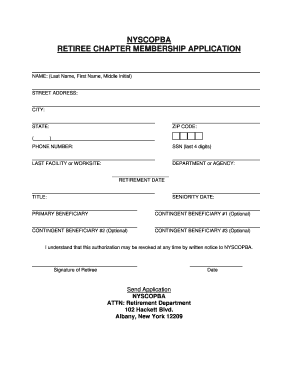
Completing the Nyscopba Retiree Chapter Membership Application online is a straightforward process that allows retirees to become members of the organization. This guide will provide you with detailed instructions on how to navigate each section of the form effectively.
Follow the steps to complete your application accurately.
- Press the ‘Get Form’ button to access the Nyscopba Retiree Chapter Membership Application. This will allow you to open the document in your browser for easy editing.
- Start by entering your name in the designated fields, which include your last name, first name, and middle initial. Ensure that you fill in each part accurately to avoid any delays in processing your application.
- Provide your street address to ensure the organization has an accurate record of your residence. This is crucial for correspondence and membership communications.
- Fill in your city, state, and zip code in the respective fields. This information is necessary for demographic and mailing purposes.
- Enter your phone number, ensuring it is a contact number where you can be reached for any membership-related inquiries.
- Provide the last four digits of your Social Security number. This information is requested for identification purposes only.
- In the next section, enter the name of your last facility or worksite and your department or agency. This helps establish your employment background.
- Indicate your retirement date. It is essential that this date is filled out correctly to ensure eligibility for membership.
- Enter your title at the time of retirement. This detail provides context about your professional background.
- Fill in your seniority date, which is typically the date you began employment. This may be relevant for certain membership benefits.
- Proceed to list your primary beneficiary. This is the individual you want to designate for any benefits linked to your membership.
- Acknowledge your understanding that this authorization may be revoked at any time by submitting a written notice to Nyscopba.
- Finally, sign the application in the designated area and include the date of signing. Your signature indicates your agreement to the terms outlined in the application.
- After completing the form, you can save your changes, download, print, or share the document as needed before submitting it.
Begin completing your Nyscopba Retiree Chapter Membership Application online now to join a community dedicated to supporting retirees.
Related links form
Scan the form and save it to your computer as a PDF. Sign in to Retirement Online. Click the “Upload a Member Document” link on the Employer Account Homepage. Follow the steps to upload your saved version of the RS6221 form, specify the member's NYSLRS ID or registration number, and click “Submit.”