Loading
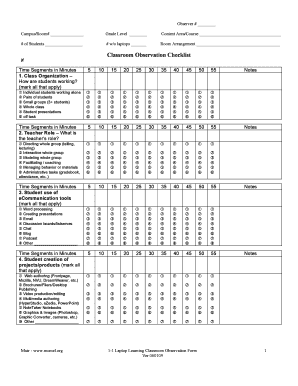
Get Laptop Learning Classroom Observation Form - Hcpssleadership1and2 Wikispaces Hcpss
How it works
-

Open form follow the instructions
-

Easily sign the form with your finger
-

Send filled & signed form or save
How to use or fill out the Laptop Learning Classroom Observation Form - Hcpssleadership1and2 Wikispaces Hcpss online
This guide provides expert instructions for completing the Laptop Learning Classroom Observation Form. The online form helps users collect essential data regarding classroom dynamics and technology integration to improve educational practices.
Follow the steps to complete the Laptop Learning Classroom Observation Form effectively.
- Press the ‘Get Form’ button to access the form and open it in your preferred online editor.
- In the fields provided, enter the observer number and classroom details such as campus, room number, grade level, content area, number of students, and number of students without laptops.
- Fill out the room arrangement by describing the physical layout of the classroom.
- Complete the Classroom Observation Checklist by marking the time segments for student organization methods, including individual work, pairs, small groups, or whole class activities.
- Describe the teacher's role during the observation by selecting the appropriate categories provided.
- Assess the use of eCommunication tools by marking all relevant options utilized by students during the observation.
- Indicate the types of student-created projects or products by marking the applicable choices.
- Document the inquiry tools used by students during the class observation.
- Rate the use of content-specific learning tools as per the selections provided.
- Complete the section regarding electronic content and instruction, marking the applicable tools used.
- Rate the overall level of technical skills exhibited by the students.
- Indicate the variety of learning styles addressed during the lesson as stated in the options.
- Mark the cognitive levels achieved by the lesson, based on Bloom's Taxonomy.
- Provide a brief description of the lesson and note any off-task or inappropriate behavior observed.
- Evaluate the curriculum fit of the technology activity and its relevance to unit objectives.
- Assess the level of technology integration in relation to lesson objectives.
- Make final notes on student engagement indicators to summarize your overall impression of the lesson.
- Once finished, save your changes, and then choose to download, print, or share the completed form.
Get started with filling out the Laptop Learning Classroom Observation Form online today!
Industry-leading security and compliance
US Legal Forms protects your data by complying with industry-specific security standards.
-
In businnes since 199725+ years providing professional legal documents.
-
Accredited businessGuarantees that a business meets BBB accreditation standards in the US and Canada.
-
Secured by BraintreeValidated Level 1 PCI DSS compliant payment gateway that accepts most major credit and debit card brands from across the globe.