Loading
Get Request For Dan Registration - Iskf.com
How it works
-

Open form follow the instructions
-

Easily sign the form with your finger
-

Send filled & signed form or save
How to fill out the REQUEST FOR DAN REGISTRATION - ISKF.com online
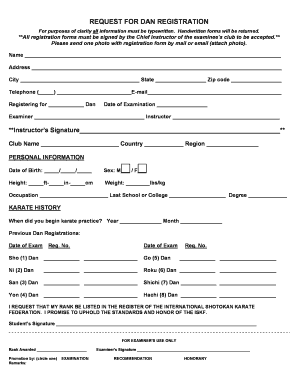
Completing the REQUEST FOR DAN REGISTRATION form is an important step for practitioners seeking to record their Dan rank with the International Shotokan Karate Federation. This guide provides clear instructions to help users accurately complete the form online.
Follow the steps to fill out the form correctly and efficiently.
- Press the ‘Get Form’ button to access the form and open it for editing.
- Begin by entering your name in the designated field at the top of the form. Ensure that you type your name clearly and accurately.
- Fill in your complete address, including city, state, and zip code. This information should be precise to avoid any issues with correspondence.
- Provide your contact information by entering a valid telephone number and email address in the specified fields.
- Indicate the Dan you are registering for by selecting the appropriate entry in the given section.
- Include the date of examination in the corresponding field to indicate when you completed the testing.
- Document the names of your examiner and instructor. Make sure to provide accurate full names as required.
- Secure your instructor's signature in the designated area to validate your registration form.
- Provide your club name, country, and region in the appropriate fields to identify your affiliation.
- Complete the personal information section, including your date of birth, sex, height, weight, and occupation. This detail contributes to a complete profile.
- In the karate history section, indicate when you began karate practice and list any previous Dan registrations, indicating dates and registration numbers as necessary.
- Affirm your request for your rank to be listed by signing in the designated area, confirming your commitment to uphold ISKF standards.
- Ensure all sections are completed, reviews the information for accuracy, and save your changes. You may download, print, or share the form as required after submitting.
Complete your REQUEST FOR DAN REGISTRATION online today to ensure your rank is officially recognized.
An Affidavit of Support should include the sponsor's personal details (name, address, date of birth, place of birth), their relationship to the immigrant, information about their employment and income, and their promise to support the immigrant.
Industry-leading security and compliance
US Legal Forms protects your data by complying with industry-specific security standards.
-
In businnes since 199725+ years providing professional legal documents.
-
Accredited businessGuarantees that a business meets BBB accreditation standards in the US and Canada.
-
Secured by BraintreeValidated Level 1 PCI DSS compliant payment gateway that accepts most major credit and debit card brands from across the globe.