Loading
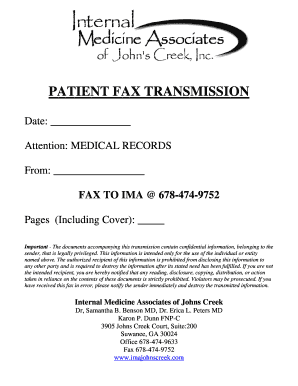
Get Medical Records Request Fax Form.doc
How it works
-

Open form follow the instructions
-

Easily sign the form with your finger
-

Send filled & signed form or save
How to fill out the Medical Records Request Fax Form.doc online
Filling out the Medical Records Request Fax Form online is a straightforward process. This guide provides step-by-step instructions to help you complete each section with ease.
Follow the steps to accurately complete the form online.
- Click the ‘Get Form’ button to obtain the form and open it in the editor.
- In the first section labeled 'Date,' enter the date that you are completing the form. This helps provide clear documentation of your request.
- In the 'Attention' field, specify 'Medical Records' to ensure your request is directed to the appropriate department.
- In the 'From' section, fill in your name or the name of the individual making the request. This identifies who is requesting access to the records.
- Include the number of pages you are faxing (including the cover sheet) in the 'Pages (Including Cover)' field. This provides clarity on the volume of information sent.
- Review the confidentiality notice section thoroughly, ensuring you understand the importance of the information being shared and the restrictions in place regarding its use.
- At this point, you can save your progress, download a copy of the completed form, print it, or share it with others who may need access.
Complete your Medical Records Request Fax Form online today for efficient processing.
They should include: 1) All relevant clinical findings. 2) A record of the decisions made and actions agreed as well as the identity of who made the decisions and agreed the actions. 3) A record of the information given to patients. 4) A record of any drugs prescribed or other investigations or treatments performed.