We use cookies to improve security, personalize the user experience, enhance our marketing activities (including cooperating with our marketing partners) and for other business use.
Click "here" to read our Cookie Policy. By clicking "Accept" you agree to the use of cookies. Read less
Read more
Accept
Loading
Form preview
  • US Legal Forms
  • Form Library
  • More Forms
  • More Uncategorized Forms
  • Uob Delight

Get Uob Delight

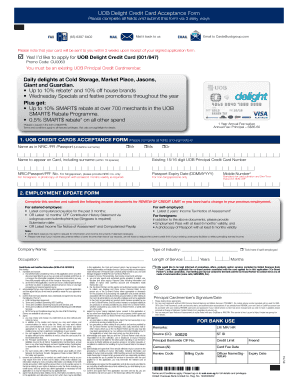
UOB Delight Credit Card Acceptance Form Please complete all fields and submit this form via 3 easy ways FAX (65) 6397 6402 Mail it back to us MAIL EMAIL Email to Cards uobgroup.com Please note that.

How it works

  1. Open form

    Open form follow the instructions

  2. Easily sign form

    Easily sign the form with your finger

  3. Share form

    Send filled & signed form or save

How to fill out the Uob Delight online

This guide offers a detailed explanation on how to complete the Uob Delight Credit Card Acceptance Form online. It aims to provide clear, step-by-step instructions for all users, regardless of their prior experience with legal documentation.

Follow the steps to complete your Uob Delight application effectively.

  1. Press the 'Get Form' button to access the Uob Delight form. This will allow you to open the document in your chosen editing tool.
  2. Begin by entering your name as it appears on your NRIC, PR, or passport. Make sure to underline your surname for clarity.
  3. Specify the name that should appear on the card, ensuring it does not exceed 19 characters, and fill in your existing UOB Principal Credit Card number.
  4. Provide your NRIC, Passport, or PR number. If you are a foreign applicant, include a photocopy of your passport valid for at least six months.
  5. Fill in the passport expiry date in the DDMMYYYY format for foreign residents.
  6. Enter your mobile number, which is mandatory for card activation and One-Time Password (SMS-OTP) notifications.
  7. Complete the employment section of the form if there has been a recent change in your job or if you are applying for a review of your credit limit.
  8. Provide relevant income documents as required based on your employment status, ensuring they are updated and accurate.
  9. Sign the application form at the bottom and date it accordingly to validate your submission.
  10. Once the form is completed, you have multiple options for submission: you can fax it, mail it back, or send it via email.
  11. Remember that your card will be dispatched within two weeks of receiving your signed application form.
  12. At the conclusion of the process, ensure you save changes, download a copy for your records, print the document, or share it as needed.

Take the next step in your financial journey by completing your Uob Delight application online today.

Get form

Experience a faster way to fill out and sign forms on the web. Access the most extensive library of templates available.
Get form

Related content

EX-10.13 6 a2239178zex-10_13.htm EX-10.13 Exhibit...
Class B Ordinary Shares. Delight Partners Holdings Ltd ... Delight Yunlu Holding Ltd...
Learn more
(DOC) Giant.docx | Yulianita Aleazurra...
Thus, Giant can reach larger market, so does the partner. Some of cross-promotional...
Learn more
Tefal Tt812116 Instruction Manual Notice Delight...
Tefal Tt812116 Instruction Manual Notice Delight Ref 3305097 B. 2015-06-09. : Tefal...
Learn more

Related links form

PETITION: EVICTION CASE - Collin County Government - Co Collin Tx Project Based Section 8 Fact Sheet - Fema N56 - Mctsformfinder.justice.gov.uk - Ministry Of Justice

Questions & Answers

Get answers to your most pressing questions about US Legal Forms API.

Contact support

Terms and conditions apply. Payments can be made via NETS or CashCard at any AXS Station islandwide. For payment made before 5.00pm, your account will be credited on the next day. Cash payment is accepted at any of our local branches.

Most banks and credit card companies have a grace period of at least 30 days where you can cancel the card and still get the annual fee refunded. Operating this way, you have the option to call for a possible retention offer after your annual fee posts.

It is better to keep unused credit cards open than to cancel them because even unused credit cards with a $0 balance will still report positive information to the credit bureaus each month. It is especially worthwhile to keep an unused credit card open when the account does not have an annual fee.

If you close the card, your average account age decreases and your total credit utilization increases. This may lead to a temporary credit score drop. If you don't close the card, it will continue to report positive information to the credit bureaus each month, even if you don't use it and there's no balance.

Log in to UOB TMRW and tap “Accounts” Next, tap on your preferred debit or credit card to waive the fee(s) ... Select the fees that you wish. to waive and tap on “Next” ... Your request is completed and will be processed within 3 to 5 business days. An sms will be sent to you if the request is unsuccessful.

To cancel your OCBC credit card, you'll have to call the OCBC customer service hotline at 6363 3333. If you are overseas, call +65 363 3333 instead. Choose the option to speak with a customer service officer.

Otherwise, you can call the UOB customer service hotline at 1800 222 2121....First, login to your UOB mobile app, then: Choose the credit card you're cancelling (from the main page) Click on “Settings” Go to the bottom right corner, scroll the horizontal menu and click on “Cancel Card”

In March 2021, UOB discontinued the UOB Delight Card Program. Consider comparing the UOB One Credit Card for bonus cash rebates on groceries and discounts on fuel. Or, check out more UOB credit cards here.

Credit experts advise against closing credit cards, even when you're not using them, for good reason. “Canceling a credit card has the potential to reduce your score, not increase it,” says Beverly Harzog, credit card expert and consumer finance analyst for U.S. News & World Report.

You can close UOB ONE ACCOUNT at the branch where the account was opened only.

Get This Form Now!

Use professional pre-built templates to fill in and sign documents online faster. Get access to thousands of forms.
Get form
If you believe that this page should be taken down, please follow our DMCA take down processhere.

Industry-leading security and compliance

US Legal Forms protects your data by complying with industry-specific security standards.
  • In businnes since 1997
    25+ years providing professional legal documents.
  • Accredited business
    Guarantees that a business meets BBB accreditation standards in the US and Canada.
  • Secured by Braintree
    Validated Level 1 PCI DSS compliant payment gateway that accepts most major credit and debit card brands from across the globe.
Get Uob Delight
Get form
Form Packages
Adoption
Bankruptcy
Contractors
Divorce
Home Sales
Employment
Identity Theft
Incorporation
Landlord Tenant
Living Trust
Name Change
Personal Planning
Small Business
Wills & Estates
Packages A-Z
Form Categories
Affidavits
Bankruptcy
Bill of Sale
Corporate - LLC
Divorce
Employment
Identity Theft
Internet Technology
Landlord Tenant
Living Wills
Name Change
Power of Attorney
Real Estate
Small Estates
Wills
All Forms
Forms A-Z
Form Library
Customer Service
Terms of Service
Privacy Notice
Legal Hub
Content Takedown Policy
Bug Bounty Program
About Us
Help Portal
Legal Resources
Blog
Affiliates
Contact Us
Delete My Account
Site Map
Industries
Forms in Spanish
Localized Forms
State-specific Forms
Forms Kit
Legal Guides
Real Estate Handbook
All Guides
Prepared for You
Notarize
Incorporation services
Our Customers
For Consumers
For Small Business
For Attorneys
Our Sites
US Legal Forms
USLegal
FormsPass
pdfFiller
signNow
airSlate WorkFlow
DocHub
Instapage
Social Media
Call us now toll free:
+1 833 426 79 33
As seen in:
  • USA Today logo picture
  • CBC News logo picture
  • LA Times logo picture
  • The Washington Post logo picture
  • AP logo picture
  • Forbes logo picture
© Copyright 1997-2025
airSlate Legal Forms, Inc.
3720 Flowood Dr, Flowood, Mississippi 39232
Form Packages
Adoption
Bankruptcy
Contractors
Divorce
Home Sales
Employment
Identity Theft
Incorporation
Landlord Tenant
Living Trust
Name Change
Personal Planning
Small Business
Wills & Estates
Packages A-Z
Form Categories
Affidavits
Bankruptcy
Bill of Sale
Corporate - LLC
Divorce
Employment
Identity Theft
Internet Technology
Landlord Tenant
Living Wills
Name Change
Power of Attorney
Real Estate
Small Estates
Wills
All Forms
Forms A-Z
Form Library
Customer Service
Terms of Service
Privacy Notice
Legal Hub
Content Takedown Policy
Bug Bounty Program
About Us
Help Portal
Legal Resources
Blog
Affiliates
Contact Us
Delete My Account
Site Map
Industries
Forms in Spanish
Localized Forms
State-specific Forms
Forms Kit
Legal Guides
Real Estate Handbook
All Guides
Prepared for You
Notarize
Incorporation services
Our Customers
For Consumers
For Small Business
For Attorneys
Our Sites
US Legal Forms
USLegal
FormsPass
pdfFiller
signNow
airSlate WorkFlow
DocHub
Instapage
Social Media
Call us now toll free:
+1 833 426 79 33
As seen in:
  • USA Today logo picture
  • CBC News logo picture
  • LA Times logo picture
  • The Washington Post logo picture
  • AP logo picture
  • Forbes logo picture
© Copyright 1997-2025
airSlate Legal Forms, Inc.
3720 Flowood Dr, Flowood, Mississippi 39232