Loading
Get Xxxvieodf Form
How it works
-

Open form follow the instructions
-

Easily sign the form with your finger
-

Send filled & signed form or save
How to use or fill out the Xxxvieodf Form online
Filling out the Xxxvieodf Form online is a straightforward process that helps users submit their enrollment or change requests efficiently. This guide provides clear, step-by-step instructions to ensure that each section of the form is completed correctly.
Follow the steps to complete the Xxxvieodf Form online
- Click the ‘Get Form’ button to obtain the form and open it in your editor.
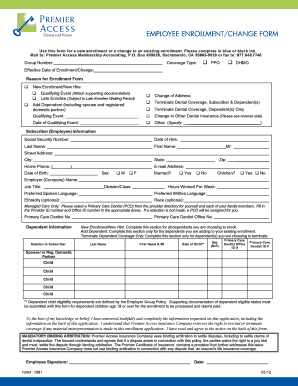
- Begin by entering your Group Number and indicating your Coverage Type by selecting either PPO or DHMO.
- Fill in the Effective Date of Enrollment/Change and the Reason for Enrollment checkboxes appropriate to your situation, such as New Enrollment or Qualifying Event.
- Provide Subscriber (Employee) Information by filling in your Social Security Number, Date of Hire, Last Name, First Name, Middle Initial, Street Address, City, State, Zip Code, Home Phone, E-mail Address, Date of Birth, and Sex.
- Indicate your marital status and whether you have children by checking the corresponding boxes.
- List your Employer (Company) Name, Job Title, Division/Class, Hours Worked Per Week, Preferred Spoken Language, and Preferred Written Language.
- For dental coverage, select a Primary Care Dentist (PCD) and provide the Provider ID number and Office ID number as required.
- Complete the Dependent Information section for each dependent being enrolled, added, or having coverage terminated. Include their Last Name, First Name, Date of Birth, and Primary Care Dentist details.
- Review the mandatory declarations and ensure that you sign and date the form, indicating your agreement with the statements provided.
- After completing all fields, save your changes, then download your form for a physical copy if needed. You may also print or share the completed form as required.
Complete your forms online today for a smooth enrollment or change process.