Loading
Get Healthstream Uab
How it works
-

Open form follow the instructions
-

Easily sign the form with your finger
-

Send filled & signed form or save
How to fill out the Healthstream Uab online
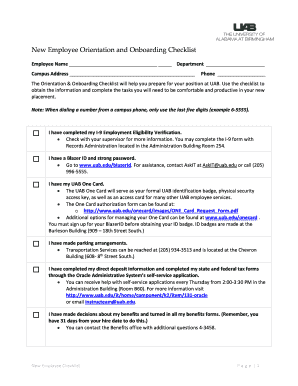
Filling out the Healthstream Uab online form is a crucial step in your onboarding process at UAB. This guide provides comprehensive, step-by-step instructions to help you complete each section accurately and efficiently.
Follow the steps to effectively complete your Healthstream Uab form.
- Click ‘Get Form’ button to obtain the Healthstream Uab form and open it in your editor.
- Enter your name in the designated Employee Name field at the top of the form.
- Fill out the Department field with your specific department name to ensure proper processing.
- Provide your campus address in the designated area. Make sure to include all relevant details such as building name and room number.
- Enter your phone number in the appropriate field. If using a campus phone, remember to include just the last five digits.
- Review the checklist items. Carefully check each task as completed, such as the I-9 Employment Eligibility Verification.
- Follow the instructions for each checklist item, such as obtaining your Blazer ID and password, and the necessary training courses.
- Complete the required fields related to benefits, tax forms, and direct deposit information as indicated.
- Verify understanding of the Family and Medical Leave Act and ensure to know your Human Resources Consultant's contact information.
- Finally, review your checklist with your supervisor and ensure all sections are complete before submission.
- Once you have filled out all necessary fields and completed the checklist, save your changes. You may download, print, or share the form as required.
Begin filling out your Healthstream Uab form online today for a smooth onboarding experience.
The default is bullets, which is small black circles. For creating an unordered list with circle bullets, use CSS property list-style-type.