Loading
Get Voluntary Resignation
How it works
-

Open form follow the instructions
-

Easily sign the form with your finger
-

Send filled & signed form or save
How to fill out the Voluntary Resignation online
This guide provides clear and supportive instructions on how to complete the Voluntary Resignation form effectively. Whether you are resigning for personal reasons or transitioning to a new role, this step-by-step guide will assist you in the process.
Follow the steps to complete your Voluntary Resignation form online.
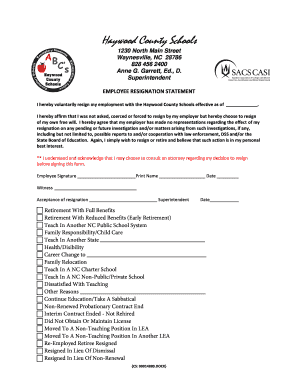
- Click ‘Get Form’ button to access the Voluntary Resignation form and open it in your preferred online editor.
- In the first section, fill in the effective date of your resignation. This is the date when your resignation will take place.
- Affirm that your resignation is voluntary. There is a statement that reads, 'I hereby affirm that I was not asked, coerced or forced to resign...' Make sure you read this carefully and ensure it reflects your situation.
- Indicate your reason for resignation by selecting one of the options provided. If your reason is not listed, use the 'Other Reasons' field to specify your reason.
- Sign the form in the designated area labeled 'Employee Signature.' Print your name in the corresponding field and include the date of signing.
- If required, have a witness sign in the appropriate field to validate your resignation.
- Once all fields are completed, review the form for accuracy. After ensuring all information is correct, save your changes.
- You may now choose to download, print, or share the completed form as needed.
Take the next steps toward completing your resignation process by filling out your Voluntary Resignation form online today.
For one thing, putting something as serious as resigning your position in writing makes it official. ... Writing a letter of resignation communicates to your employer that while you no longer want to work for them, you still respect them, and you want to maintain a professional relationship.