Loading
Get Request For Cash Withdrawal - La Capitale
How it works
-

Open form follow the instructions
-

Easily sign the form with your finger
-

Send filled & signed form or save
How to fill out the Request For Cash Withdrawal - La Capitale online
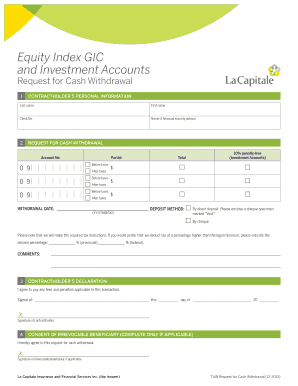
Filling out the Request For Cash Withdrawal - La Capitale online can be straightforward if you follow the right steps. This guide is designed to help users navigate each section of the form efficiently and accurately.
Follow the steps to complete your request for cash withdrawal.
- Click ‘Get Form’ button to obtain the form and open it in the editor.
- Begin by entering your personal information in the 'Contractholder’s Personal Information' section. Fill in your last name, first name, and client number. Additionally, include the name of your financial security advisor.
- Proceed to the 'Request for Cash Withdrawal' section. Enter your account number. Indicate whether you are requesting a partial or total withdrawal by selecting the appropriate option.
- Specify the amount to withdraw, providing the total in the designated field, and select whether the amount is before or after taxes for each applicable category.
- Enter the preferred withdrawal date in the format (YYYY/MM/DD).
- Choose the deposit method. Indicate if you are opting for direct deposit or a cheque. If selecting direct deposit, remember to enclose a cheque specimen marked 'Void.'
- If you would like tax deductions at a percentage higher than the legal minimum, please indicate the desired percentage for provincial and federal taxes in the provided fields.
- Use the comments section for any additional instructions or notes you may want to include regarding your withdrawal.
- Complete the 'Contractholder’s Declaration' section by signing and dating the form in the indicated spaces.
- If applicable, provide the consent of any irrevocable beneficiary by having them sign in the designated area.
- Once all fields are completed, review the form for accuracy and then save your changes, download it, print, or share the form as needed.
Begin your cash withdrawal request online today!
Check document status by logging in to DTS. Go to "Official Travel" vouchers or authorization, and then look in the "Sort by Status" column. Or, go to the digital signature page within the document. If you can't access to DTS, contact your Defense Travel Administrator (DTA) to check the status of your document.