Loading
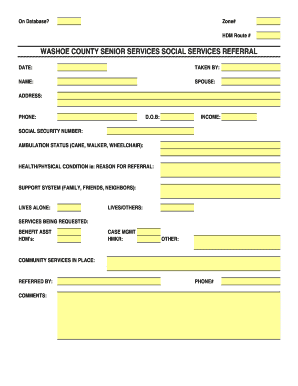
Get Referral Form Template.xls - Washoecounty
How it works
-

Open form follow the instructions
-

Easily sign the form with your finger
-

Send filled & signed form or save
How to use or fill out the REFERRAL FORM TEMPLATE.xls - Washoecounty online
Filling out the Washoecounty referral form is an important step in facilitating access to necessary services. This guide provides clear and detailed instructions on how to complete the REFERRAL FORM TEMPLATE.xls effectively.
Follow the steps to fill out the referral form accurately.
- Click the ‘Get Form’ button to obtain the form and open it in your preferred digital editor.
- In the 'Date' field, enter the current date when the referral is being made. This helps to establish a timeline for the services requested.
- In the 'Taken By' section, indicate the name of the individual who is completing the referral. This provides accountability and clarity in the process.
- Fill in the 'Name' field with the full name of the person being referred for services. Include their spouse's name in the appropriate section if relevant.
- Next, input the complete address of the person being referred. Ensure that all parts of the address are clearly stated for proper identification.
- Provide a contact number in the 'Phone' field. This ensures that the service providers can reach the individual or their support system if necessary.
- In the 'D.O.B' section, record the date of birth of the person being referred. This is vital for eligibility verification for some services.
- Enter income information in the designated field. Accurate income reporting is essential for determining service eligibility.
- Complete the 'Social Security Number' section with the appropriate number. This is used for identification and to link services.
- Indicate the ambulation status of the person (e.g., cane, walker, wheelchair). This helps in assessing their mobility needs.
- In the 'Health/Physical Condition' section, provide a brief description of the reason for referral. This should include any relevant health concerns.
- Outline the 'Support System' by listing family, friends, or neighbors who may assist the person. This helps assess the person’s current support network.
- Indicate whether the person lives alone or with others in the corresponding fields. This context can foster appropriate service recommendations.
- Specify the services being requested by checking off each applicable box, including benefit assistance, home-delivered meals, case management, and homemaker services.
- Mention any community services that are already in place under the 'Community Services in Place' section to give a fuller picture of the person's situation.
- Fill in the 'Referred By' field with the name of the individual or agency making the referral. This adds transparency to the referral process.
- Use the comments section to provide any additional relevant information that may assist service providers in understanding the person’s needs.
Complete your documents online to ensure timely access to necessary services.
Those new licenses can now be purchased, and starting January 1, 2023, will be good for the remainder of the year — and all licenses purchased after January 1 will be valid for the subsequent 365 days.