Loading
Get Mayo Clinic Authorization To Disclose Protected Health Information
How it works
-

Open form follow the instructions
-

Easily sign the form with your finger
-

Send filled & signed form or save
How to fill out the Mayo Clinic Authorization To Disclose Protected Health Information online
This guide will help you navigate the process of completing the Mayo Clinic Authorization To Disclose Protected Health Information form online. By following these clear steps, you can ensure that your information is accurately conveyed and properly handled.
Follow the steps to complete the authorization form effectively.
- Press the ‘Get Form’ button to access the authorization form and open it in your digital editor.
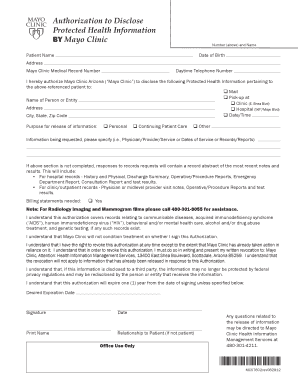
- Begin by entering the patient’s name, date of birth, address, and Mayo Clinic medical record number in the respective fields. This information is crucial for identifying the individual's records.
- Provide a daytime telephone number where you can be reached for any follow-up questions or clarifications.
- Identify the person or entity to whom you are authorizing the release of information by selecting the appropriate options: Mail, Pick-up, or Clinic/Hospital. If mail or pick-up, be sure to provide the name and address for accurate delivery.
- Specify the purpose for the release of information using the provided options: Personal, Continuing Patient Care, or Other. Be prepared to give further details if necessary.
- Clearly list the specific information being requested, such as physician/provider names, service details, or dates of service. Note that if this section is incomplete, only a record abstract will be provided.
- Indicate if billing statements are needed by checking 'Yes' if applicable. Review the additional note regarding radiology imaging for further assistance information.
- Acknowledge the understanding of various health records that the authorization covers by reading through the statement. This includes significant health concerns and treatment records.
- Confirm that the authorization is not contingent upon treatment by understanding that your care will not be affected by signing or refusing to sign the authorization.
- Observe your rights concerning revocation of the authorization, including the process for how to withdraw consent in writing.
- Fill out the expiration date for the authorization, or leave it blank for it to automatically expire in one year from the date of signing.
- Finally, sign the form, provide the date, print your name, and indicate your relationship to the patient if you are completing the form on their behalf.
- Once all fields are completed, you can save changes, download, print, or share the form as needed.
Complete your authorization form online today to ensure efficient management of your health information.
Requests to release records to any other recipients must be submitted by mail.) Fax request to Mayo Clinic Health Information Management Services at 480-301-7282. Questions related to release of records may be directed to Mayo Clinic Health Information Management Services at 480-301-4211.