Loading
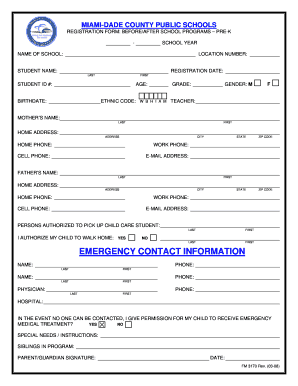
Get Emergency Contact Information - Perrine Elementary School - Miami ... - Perrineelementary
How it works
-

Open form follow the instructions
-

Easily sign the form with your finger
-

Send filled & signed form or save
How to fill out the Emergency Contact Information - Perrine Elementary School - Miami online
Filling out the Emergency Contact Information form for Perrine Elementary School is an important task to ensure your child's safety. This guide provides clear, step-by-step instructions to help you complete the form accurately and efficiently.
Follow the steps to successfully fill out your emergency contact information form.
- Press the ‘Get Form’ button to obtain the Emergency Contact Information form and open it in your preferred editor.
- Begin by entering the student's name in the designated fields. Fill in the last name followed by the first name.
- Provide the registration date, which is typically the date you are filling out the form.
- Fill in the student ID number, which can usually be found on previous school documents.
- Enter the student's birthdate and age in the specified sections.
- Indicate the student's grade and gender by selecting the appropriate options from the provided list.
- Input the name of the child's teacher to assist with proper identification.
- Next, provide the contact information for the mother including name, home address, phone numbers, and email address.
- Repeat step 8 for the father’s contact information.
- List any persons authorized to pick up the child and state if the child is authorized to walk home.
- For emergency contacts, fill in the names and phone numbers in the designated area, ensuring that at least two contacts are provided.
- List the child's physician and hospital information for emergencies requiring medical attention.
- Specify any permissions for emergency medical treatment in the provided section.
- If your child has any special needs or instructions, detail these carefully in the corresponding field.
- Finally, review all entered information for accuracy and sign the form, noting the date.
- Once completed, you can save changes, download the document, print it, or share it as needed.
Complete your documents online to ensure your child's emergency information is secure.
Miami-Dade County School District Phone: (305) 995-2037. Other: Email: Website: http://.dadeschools.net.
Industry-leading security and compliance
US Legal Forms protects your data by complying with industry-specific security standards.
-
In businnes since 199725+ years providing professional legal documents.
-
Accredited businessGuarantees that a business meets BBB accreditation standards in the US and Canada.
-
Secured by BraintreeValidated Level 1 PCI DSS compliant payment gateway that accepts most major credit and debit card brands from across the globe.