Loading
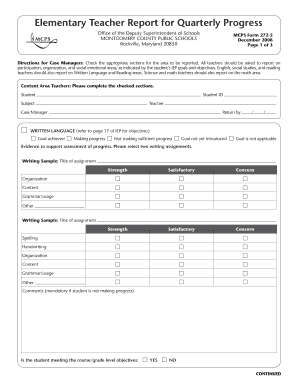
Get Mcps Teacher Report
How it works
-

Open form follow the instructions
-

Easily sign the form with your finger
-

Send filled & signed form or save
How to fill out the Mcps Teacher Report online
The Mcps Teacher Report is a crucial document used to assess student progress in various academic and social aspects. This guide provides clear instructions to help users complete the form effectively and ensure that all necessary information is reported accurately.
Follow the steps to successfully complete the Mcps Teacher Report.
- Press the ‘Get Form’ button to access the form and open it for editing.
- Begin by entering the student's name in the designated field labeled 'Student.' This is the individual whose progress you are assessing.
- Fill in the 'Student ID' field with the unique identifier assigned to the student by the school.
- In the 'Subject' section, indicate the subject area you are evaluating, such as math, reading, or written language.
- Enter your name as the teacher in the 'Teacher' field and the name of the case manager in the appropriate section.
- Provide the due date for the report in the 'Return by' section using the format MM/DD/YYYY.
- Move to the relevant subject areas (written language, math, reading, social/emotional, organization, and participation) and check the appropriate boxes to indicate the student's progress as per the IEP goals.
- For each subject, select two assignments or assessments to support your evaluation. Enter the titles of these assignments in the space provided.
- Complete the assessment fields for each area, indicating whether the student has met goals or is making progress by checking the corresponding boxes.
- If the student is not making sufficient progress, you are required to provide comments in the designated sections to document your observations and concerns.
- Once all relevant sections are filled out, review your input for accuracy and completeness.
- Finally, save your changes, download the document for your records, print a physical copy if necessary, or share the completed form with the appropriate stakeholders.
Complete the Mcps Teacher Report online today to ensure accurate student progress tracking.
Consortia/Choice Through the Choice process, students and their parents complete a form identifying their school preference. While most students get their first choice, it is not guaranteed.