Loading
Get Loomis Dental Insurance
How it works
-

Open form follow the instructions
-

Easily sign the form with your finger
-

Send filled & signed form or save
How to fill out the Loomis Dental Insurance online
This guide provides clear, step-by-step instructions for filling out the Loomis Dental Insurance claim form online. Users of all experience levels will find it helpful in navigating the necessary fields and sections.
Follow the steps to successfully complete your form.
- Click ‘Get Form’ button to obtain the form and open it in your preferred editing tool.
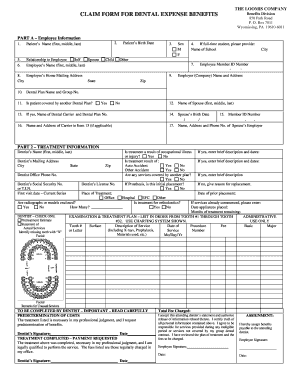
- Begin with Part A – Employee Information. Fill in the patient's name, relationship to the employee, and the employee's name. Make sure to include the employee's home mailing address, city, state, and zip code. Also, indicate the employee's Member ID Number.
- Complete the patient’s birth date and sex section. If the patient is a full-time student, provide the name and city of the school they attend.
- In the next section, indicate whether the patient is covered by another dental plan by selecting 'Yes' or 'No.' If applicable, provide the name of the dental carrier and the dental plan number.
- Proceed to Part 2 – Treatment Information. Enter the dentist's name, mailing address, city, state, zip code, and phone number. Include the dentist's social security number or tax identification number, and their license number.
- Document the first visit date and specify the place of treatment. Indicate if the treatment is for orthodontics and fill out any details regarding prior treatments if they apply.
- List the examination and treatment plan in order from tooth #1 to tooth #32, using the provided charting system. Record the tooth number, surface, description of service, date of procedure, and associated fees.
- Indicate if radiographs or models are enclosed and how many. Choose the appropriate options for treatment requests and check whether any services are covered by another plan.
- Ensure the dentist fills out the necessary sections, including a predetermination of costs and treatment completion statements. They must sign and date where required.
- Finally, the employee must review all information for accuracy and sign the form, certifying the truth of all personal information and assigning benefits payable to the attending dentist.
- Once completed, save changes to your document. You may then download, print, or share the form as needed.
Complete your Loomis Dental Insurance claim form online today and ensure you secure your dental benefits.
Call us at 951-685-7478. Or fill out the form below and we'll contact you shortly.