Loading
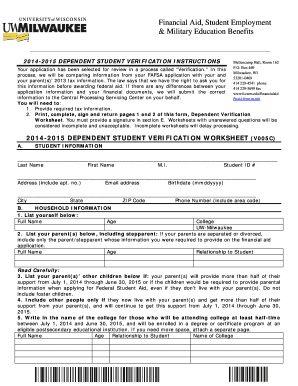
Get 2014-15 Dependent Verification Worksheet And Instructions. Architecture Summer Camp Registration
How it works
-

Open form follow the instructions
-

Easily sign the form with your finger
-

Send filled & signed form or save
How to fill out the 2014-15 Dependent Verification Worksheet And Instructions. Architecture Summer Camp Registration online
This guide provides clear and detailed instructions on how to properly complete the 2014-15 Dependent Verification Worksheet and associated instructions for the Architecture Summer Camp Registration. Follow these steps to ensure your form is filled out correctly and submitted without delay.
Follow the steps to complete your worksheet successfully.
- Click 'Get Form' button to access the worksheet and open it in your document management system.
- Fill in your student information, including your last name, first name, middle initial, student ID, address, email, birthdate, city, state, ZIP code, and phone number. This section ensures that the worksheet is correctly associated with you.
- Complete the household information section, starting with your details and then listing your parent(s). Ensure to include stepparents if applicable. If your parents are separated, only include the parent whose details you provided on the FAFSA. This provides clarity on financial responsibility.
- In the household section, include your parent(s)' other children if they will receive over half their support from your parents from July 1, 2014 to June 30, 2015. This helps identify who depends on your household financially.
- List anyone else living with your parents who receives more than half their support from them. Document their age, relationship to you, and the name of the college they will attend if they are enrolled at an eligible institution at least half-time.
- If applicable, fill in the child support section, noting any child support payments made in 2013, thus ensuring accurate financial documentation.
- Answer the additional information questions, specifically regarding SNAP benefits during 2012 or 2013. This helps in assessing your financial needs accurately.
- Complete the tax transcript and income information section. Indicate if you or your parent used the IRS Data Retrieval Tool, enclosed a tax return transcript, or if you were not required to file. Accurate tax information is critical for financial aid considerations.
- Sign the worksheet in the designated section, making sure both you and at least one parent sign. This confirms that the information you provided is accurate and complete.
- After completing the worksheet, review all entries for accuracy. Once confirmed, you can save your changes, download or print the completed form, and share it with the Financial Aid Department as required.
Ensure your forms are completed and submitted online to facilitate timely financial aid processing.
TXT is considered the original text file format and the equivalent of the binary file. Since a TXT file doesn't contain any formatting such as bolding or fonts, no separate software is needed to open or edit it. Most operating systems include word processing programs that can create and open the TXT format.