Loading
Get Xx Uuu
How it works
-

Open form follow the instructions
-

Easily sign the form with your finger
-

Send filled & signed form or save
How to fill out the Xx Uuu online
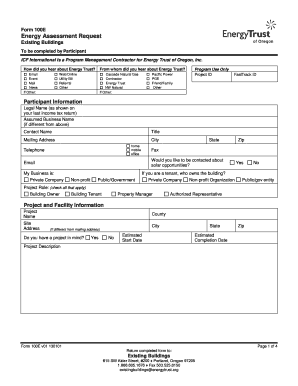
Completing the Xx Uuu form is an essential step in initiating your energy assessment request for existing buildings. This guide provides clear and supportive instructions to help you navigate the form efficiently, ensuring you provide all necessary information.
Follow the steps to complete the Xx Uuu form online effectively.
- Click the ‘Get Form’ button to access the Xx Uuu form and open it for editing.
- Begin with the section titled 'How did you hear about Energy Trust?' and select the appropriate option that describes your source of information.
- In the 'Participant Information' section, fill in your legal name as it appears on your last income tax return, along with your assumed business name if it differs.
- Provide your contact name, title, and full mailing address, including city, state, and zip code. Include your preferred telephone number and email address.
- Indicate if you would like to be contacted about solar opportunities by selecting 'Yes' or 'No'.
- Identify your business type by selecting from the options provided: Private Company, Non-profit, or Public/Government.
- Specify your project role by checking all applicable boxes, such as Building Owner or Tenant.
- For the 'Project and Facility Information' section, enter the project name and site address, ensuring to specify the county and city.
- Answer whether you have a specific project in mind and provide estimated start and completion dates.
- Detail the project description, clearly outlining the scope and goals of your energy assessment.
- List your primary and secondary heating fuel sources by selecting from the options provided.
- In the 'Projected Uses by Percentage of Square Footage' section, provide the appropriate percentages for the different uses of the building (e.g., Office, Restaurant, etc.).
- Fill in the 'Qualifying Questions' section by responding to inquiries about previous energy assessments, areas of interest for energy efficiency, ROI requirements, and funding availability.
- Provide electric and gas utility information, including account numbers and attaching copies of recent utility bills, if available.
- Sign and date the form in the 'Signature' section to authorize Energy Trust to access your energy usage data.
- Review all completed fields to ensure accuracy before finalizing your submission.
- Once satisfied with the information provided, save your changes, and choose to download, print, or share the completed form as needed.
Complete your energy assessment request online today to start benefiting from energy-efficient solutions!
A deed must state the name and address for the current owner making the transfer (the grantor) and the new owner receiving the property (the grantee). A deed with more than one grantor or grantee must include the names and addresses of all parties.
Industry-leading security and compliance
US Legal Forms protects your data by complying with industry-specific security standards.
-
In businnes since 199725+ years providing professional legal documents.
-
Accredited businessGuarantees that a business meets BBB accreditation standards in the US and Canada.
-
Secured by BraintreeValidated Level 1 PCI DSS compliant payment gateway that accepts most major credit and debit card brands from across the globe.