Loading
Get Ymca Direct Deposit
How it works
-

Open form follow the instructions
-

Easily sign the form with your finger
-

Send filled & signed form or save
How to fill out the YMCA Direct Deposit online
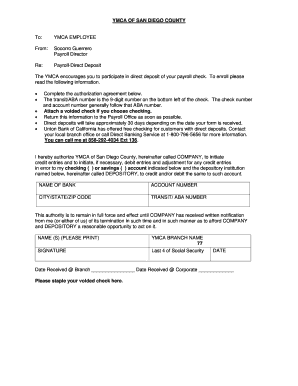
This guide provides comprehensive instructions for users on how to fill out the YMCA Direct Deposit form online. By following these steps, you can easily participate in the direct deposit of your payroll check, ensuring timely and secure payment.
Follow the steps to complete the YMCA Direct Deposit form online.
- Press the ‘Get Form’ button to access the YMCA Direct Deposit form and open it for editing.
- Begin by completing the authorization agreement section of the form. This section grants the YMCA permission to deposit your payroll directly into your bank account.
- Enter the name of your bank in the appropriate field, ensuring correct spelling.
- Fill in your account number, which is typically located on your bank statement or check.
- Provide your bank's city, state, and ZIP code to accurately identify your banking institution.
- Locate your transit/ABA number, which is the 9-digit number found on the bottom left of your check. Input this number in the specified field.
- Indicate whether you want the funds deposited into a checking or savings account by marking the corresponding box.
- Attach a voided check if you are opting for direct deposit into a checking account; this provides the correct account information to your bank.
- Print your name in the designated area and provide your signature to authorize the direct deposit.
- Lastly, fill in the date, and mark the location field if relevant, before saving your changes or preparing to submit the document.
Complete the YMCA Direct Deposit form online today for seamless payroll deposits.
Usually, you'll have access to your direct deposit at the opening of business on your payday — by 9 a.m. In many cases, direct deposits hit accounts even earlier, often between midnight and 6 a.m. on payday morning. But there are factors that can affect how long it takes your direct deposit to become available.