Loading
Get Cobra Election Form (hbd-85) - Calpers Ca
How it works
-

Open form follow the instructions
-

Easily sign the form with your finger
-

Send filled & signed form or save
How to fill out the Cobra Election Form (HBD-85) - Calpers Ca online
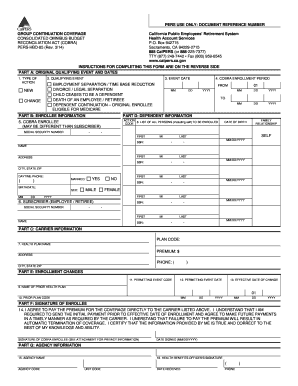
Completing the Cobra Election Form (HBD-85) is essential for individuals seeking to maintain their health insurance coverage after a qualifying event. This guide provides clear, step-by-step instructions to help users fill out the form accurately and efficiently online.
Follow the steps to complete the Cobra Election Form accurately.
- Press the ‘Get Form’ button to acquire the Cobra Election Form (HBD-85) and open it in the editor.
- In Part A, indicate the type of action by selecting either 'NEW' for a new enrollment or 'CHANGE' if you are adding or changing a family member. Next, select the applicable qualifying event from the list provided, such as employment separation or divorce. Then, fill in the exact event date and denote the COBRA enrollment period.
- In Part B, provide all requested enrollee information, including the COBRA enrollee’s social security number, name, address, and contact details. If the enrollee is not the original subscriber, ensure the subscriber's information is also included.
- In Part C, identify the health plan carrier's name from which you are continuing coverage, and include the corresponding plan code and premium amount.
- Move to Part D and list all individuals to be enrolled, including yourself. Use the action code ‘A’ for newly enrolled individuals or ‘D’ for those being removed. Make sure to provide the date of birth and family relationship for each individual listed.
- In Part E, if you are changing your health plan, indicate the name and plan code of your prior health plan. Complete the permitting event code, if applicable, along with the event dates as specified.
- Part F requires the enrollee to sign and date the form, confirming their understanding and agreement to pay premiums directly to the specified carrier.
- Finally, Part G needs to be filled out by the agency, including the health benefits officer's signature and date received.
- After completing all sections, review the information for accuracy. Users can then save changes, download, print, or share the form as necessary.
Ensure you complete the Cobra Election Form online to maintain your health coverage seamlessly.
Employers are responsible for notifying their Cal-COBRA members of the transition to a new carrier and Cal-COBRA members are required to fill out the form and submit it to the Cal-COBRA team within 30 days of transition. Information on COBRA subsidies from the 2021 American Rescue Plan Act is available here.