Loading
Form preview
  • US Legal Forms
  • Form Library
  • More Forms
  • More Uncategorized Forms
  • Brookstreetonline

Get Brookstreetonline

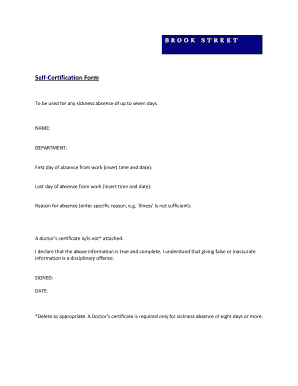
Time and date): Reason for absence (enter specific reason, e.g. Illness is not sufficient): A doctor s certificate is/is not* attached. I declare that the above information is true and complete. I understand that giving false or inaccurate information is a disciplinary offence. SIGNED: DATE: *Delete as appropriate. A Doctor s certificate is required only for sickness absence of eight days or more.

How it works

  1. Open form

    Open form follow the instructions

  2. Easily sign form

    Easily sign the form with your finger

  3. Share form

    Send filled & signed form or save

How to fill out the Brookstreetonline self-certification form online

Completing the Brookstreetonline self-certification form is an essential process for documenting short-term sickness absences. This guide will provide you with detailed instructions to help you accurately fill out the form with ease.

Follow the steps to successfully complete the form

  1. Click 'Get Form' button to obtain the self-certification form and access it in the online editor.
  2. Enter your full name in the designated 'NAME' field, ensuring that it matches your official records.
  3. Fill in your department in the 'DEPARTMENT' field. This will help identify your place of work.
  4. For the 'First day of absence from work,' enter the exact date and time you began your absence.
  5. In the 'Last day of absence from work' field, input the precise date and time you returned to work or expect to return.
  6. Detail the reason for your absence in the 'Reason for absence' section, providing a specific explanation rather than a general term like 'Illness.'
  7. Indicate whether a doctor's certificate is attached by checking the appropriate option — either 'is' or 'is not,' as applicable. Remember, a doctor's certificate is only required for absences of eight days or more.
  8. Read the declaration statement carefully, then confirm that the information provided is true and complete. Understand the implications of submitting false information.
  9. Sign your name in the 'SIGNED' field and write the current date in the 'DATE' field to authenticate your submission.
  10. Finally, save your changes, download the completed form, print it, or share it as needed to submit your self-certification.

Complete your self-certification forms online with ease and accuracy today!

Get form

Experience a faster way to fill out and sign forms on the web. Access the most extensive library of templates available.
Get form

Related content

Brookstreet | The Department of Financial...
Brookstreet. License or Case Number: File No.: CRD 14667. Date of Initial Action:...
Learn more
SEC News Digest, August 15, 2012 - SEC.gov
Aug 15, 2012 — In the Matter of Stanley C. Brooks and Brookstreet Securities Corp....
Learn more
Terry Matthews - qaz.wiki - QWERTY.WIKI
Han ejer Celtic Manor Resort , KRP Properties , Brookstreet Hotel og ... Ubiquity Software...
Learn more

Related links form

Filming And Recording Release Form - Badoptioncab Protist Internet Lab Hsct Mrrequest Parallon Com Studying Pedigrees Activity

Questions & Answers

Get answers to your most pressing questions about US Legal Forms API.

Contact support

Prepare a so-called media kit that's made of: A press release. A new brand identity (ideally with the old one for comparison) Additional elements (e.g., a detailed explanation of the story behind the rebranding) Quotes from key people in your company and the company/designer responsible for the rebranding.

1:25 5:05 Introduce new logo on Instagram: 10 tips - YouTube YouTube Start of suggested clip End of suggested clip And simple sales materials. This means using bright colorful images that are attention grabbing. ButMoreAnd simple sales materials. This means using bright colorful images that are attention grabbing. But not too overwhelming. Remember people are visual creatures but Instagram is full of noise.

Introduce the new logo on social media by posting graphics that represent it and include some of the text. Post a picture of the new logo with the tagline "We're [company name]," followed by a link to your website. Use hashtags like #branding, #logo, and #marketing.

How to Launch Your New Logo MAKE SURE YOUR BRANDING IS COMPLETE. Do the rest of your branded elements align with your new logo? ... UPDATE YOUR BRANDED MATERIALS. ... CREATE A TEASER CAMPAIGN. ... DO AN INTERNAL LAUNCH FIRST. ... LAUNCH EVERYTHING AT ONCE. ... CREATE A ROLLOUT CAMPAIGN.

Contents Step 1: Think About the Main Purpose of Your Logo. Step 2: Understand Your Brand. Step 3: Understand Your Audience. Step 4: Design! Step 5: Don't Rush the Launch! Step 6: Do an Internal Launch First. Step 7: Ensure All Your Brand Materials Are Aligned with the New Logo Launch.

When you launch your new logo on Instagram, you don't want to overwhelm your followers with too much information. Keep your announcement short and to the point. Focus on high-quality content and visuals. Let your followers know what's coming and why they should be excited about it.

Let your customers or families know about your refresh or rebrand ahead of time. You can use a series of explanatory emails or social media posts to make your new logo announcement — and make it celebratory! Don't suddenly change your logo without explanation. Bring your clients along on the journey!

Get This Form Now!

Use professional pre-built templates to fill in and sign documents online faster. Get access to thousands of forms.
Get form
If you believe that this page should be taken down, please follow our DMCA take down processhere.

Industry-leading security and compliance

US Legal Forms protects your data by complying with industry-specific security standards.
  • In businnes since 1997
    25+ years providing professional legal documents.
  • Accredited business
    Guarantees that a business meets BBB accreditation standards in the US and Canada.
  • Secured by Braintree
    Validated Level 1 PCI DSS compliant payment gateway that accepts most major credit and debit card brands from across the globe.
Get Brookstreetonline
Get form
  • Adoption
  • Bankruptcy
  • Contractors
  • Divorce
  • Home Sales
  • Employment
  • Identity Theft
  • Incorporation
  • Landlord Tenant
  • Living Trust
  • Name Change
  • Personal Planning
  • Small Business
  • Wills & Estates
  • Packages A-Z
  • Affidavits
  • Bankruptcy
  • Bill of Sale
  • Corporate - LLC
  • Divorce
  • Employment
  • Identity Theft
  • Internet Technology
  • Landlord Tenant
  • Living Wills
  • Name Change
  • Power of Attorney
  • Real Estate
  • Small Estates
  • Wills
  • All Forms
  • Forms A-Z
  • Form Library
  • Legal Hub
  • About Us
  • Help Portal
  • Legal Resources
  • Blog
  • Affiliates
  • Contact Us
  • Delete My Account
  • Site Map
  • Industries
  • Forms in Spanish
  • Localized Forms
  • State-specific Forms
  • Forms Kit
  • Real Estate Handbook
  • All Guides
  • Notarize
  • Incorporation services
  • For Consumers
  • For Small Business
  • For Attorneys
  • USLegal
  • FormsPass
  • pdfFiller
  • signNow
  • altaFlow
  • DocHub
  • Instapage
Form Packages
  • Adoption
  • Bankruptcy
  • Contractors
  • Divorce
  • Home Sales
  • Employment
  • Identity Theft
  • Incorporation
  • Landlord Tenant
  • Living Trust
  • Name Change
  • Personal Planning
  • Small Business
  • Wills & Estates
  • Packages A-Z
Form Categories
  • Affidavits
  • Bankruptcy
  • Bill of Sale
  • Corporate - LLC
  • Divorce
  • Employment
  • Identity Theft
  • Internet Technology
  • Landlord Tenant
  • Living Wills
  • Name Change
  • Power of Attorney
  • Real Estate
  • Small Estates
  • Wills
  • All Forms
  • Forms A-Z
  • Form Library
Customer Service
  • Legal Hub
  • About Us
  • Help Portal
  • Legal Resources
  • Blog
  • Affiliates
  • Contact Us
  • Delete My Account
  • Site Map
  • Industries
  • Forms in Spanish
  • Localized Forms
  • State-specific Forms
  • Forms Kit
Legal Guides
  • Real Estate Handbook
  • All Guides
Prepared for you
  • Notarize
  • Incorporation services
Our Customers
  • For Consumers
  • For Small Business
  • For Attorneys
Our Sites
  • USLegal
  • FormsPass
  • pdfFiller
  • signNow
  • altaFlow
  • DocHub
  • Instapage
Social Media
Call us now toll free:
+1 833 426 79 33
As seen in:
© Copyright 1999-2026 airSlate Legal Forms, Inc. 3720 Flowood Dr, Flowood, Mississippi 39232
  • Your Privacy Choices
  • Terms of Service
  • Privacy Notice
  • Content Takedown Policy
  • Bug Bounty Program