Loading
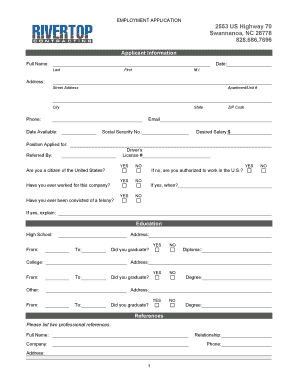
Get Job Application - Rivertop Contracting
How it works
-

Open form follow the instructions
-

Easily sign the form with your finger
-

Send filled & signed form or save
How to fill out the Job Application - Rivertop Contracting online
This guide provides comprehensive instructions for completing the Job Application for Rivertop Contracting online. By following these steps, users can efficiently navigate the application process and ensure that all necessary information is accurately provided.
Follow the steps to fill out the Job Application form successfully.
- Press the ‘Get Form’ button to access the application form and open it for completion.
- Fill in the applicant information section. Start with your full name, including your last name, first name, and middle initial. Then input your address details: street address, apartment/unit number, city, state, and ZIP code. Include your phone number and email address.
- Indicate your availability date and enter your Social Security number. Specify your desired salary and position applied for. Provide your driver’s license number if applicable.
- Respond to the questions regarding your previous employment and citizenship status. Indicate if you have ever worked for Rivertop Contracting or been convicted of a felony by selecting 'YES' or 'NO'. If applicable, detail your authorization to work in the U.S.
- Complete the education section by listing your high school and any college education. Include the addresses, dates attended, and whether you graduated. Specify the degree earned if applicable for college education.
- In the references section, provide two professional references. Include their full name, relationship to you, company name, phone number, and address.
- Provide details of your previous employment. For each job, include the company name, phone number, address, supervisor’s name, job title, starting and ending salaries, responsibilities, and the reason for leaving. Indicate if you allow contact with your previous supervisor.
- If applicable, fill out the military service section with the branch of service, dates of service, rank at discharge, and type of discharge. Provide explanations if your discharge was other than honorable.
- Review the disclaimer and signature section. Certify that all provided information is true and complete by signing and dating the application.
- Once all sections are completed, save your changes. You can then download, print, or share the form as needed.
Begin filling out your application online to take the next step in your career with Rivertop Contracting.
Minnesota Department of Human Services does not charge recipients to receive text messages. However, message and data rates may apply.