Loading
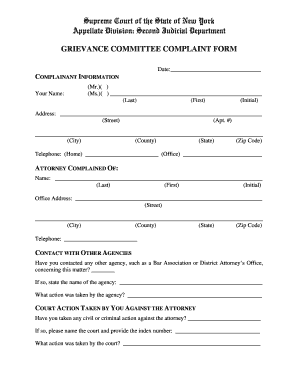
Get Grievance Committee Complaint Form - Nycourts
How it works
-

Open form follow the instructions
-

Easily sign the form with your finger
-

Send filled & signed form or save
How to fill out the Grievance Committee Complaint Form - Nycourts online
Filling out the Grievance Committee Complaint Form - Nycourts online can seem daunting, but this guide will help you navigate each section with ease. By following these clear instructions, you will be better prepared to communicate your concerns effectively.
Follow the steps to fill out the complaint form successfully.
- Click ‘Get Form’ button to obtain the form and open it in the editor.
- Begin by providing your personal information in the 'Complainant Information' section. Fill in your name, ensuring to specify your preferred title (Mr., Ms.) for clarity. Then, enter your complete address including the street, apartment number (if applicable), city, county, state, and zip code.
- In the same section, provide your contact numbers, including your home and office telephone numbers. This information is crucial for follow-up communications.
- Next, move to the 'Attorney Complained Of' section. Here, enter the name of the attorney you are filing your complaint against, along with their office address. Similar to the previous section, make sure to include all relevant details like street, city, county, state, and zip code.
- Indicate if you have contacted any other agency regarding this matter by checking the appropriate box. If you have, name the agency and briefly describe the actions taken by that agency.
- In the 'Court Action Taken By You Against The Attorney' section, specify if any civil or criminal actions have been taken against the attorney. Provide the name of the court and the index number, if applicable, along with details about any court actions.
- In the 'Allegations' section, explain your complaint against the attorney as thoroughly as possible. Include details such as when you retained the attorney, the amount paid, the services agreed upon, and any discrepancies in the services provided. Attach copies of all relevant documents that support your claim, along with witness information if available.
- Finally, ensure that you sign the form in the designated area. Remember that unsigned complaints or those submitted via email or fax will not be processed.
- After completing all sections, save your changes. You can also choose to download, print, or share the form as needed.
Complete your documents online today.
New York Courts Put Attorney Discipline Records Online The New York court system has added records showing whether an attorney has been disciplined to its publicly available online database.
Industry-leading security and compliance
US Legal Forms protects your data by complying with industry-specific security standards.
-
In businnes since 199725+ years providing professional legal documents.
-
Accredited businessGuarantees that a business meets BBB accreditation standards in the US and Canada.
-
Secured by BraintreeValidated Level 1 PCI DSS compliant payment gateway that accepts most major credit and debit card brands from across the globe.