Loading
Get Abf Bol Pdf
How it works
-

Open form follow the instructions
-

Easily sign the form with your finger
-

Send filled & signed form or save
How to fill out the Abf Bol Pdf online
Completing the Abf Bol Pdf is essential for ensuring safe and effective shipment during trade shows. This guide will provide straightforward instructions to assist you in accurately filling out the form online, ensuring all necessary details are captured.
Follow the steps to complete the Abf Bol Pdf form online
- Click ‘Get Form’ button to obtain the form and open it in your preferred online editor.
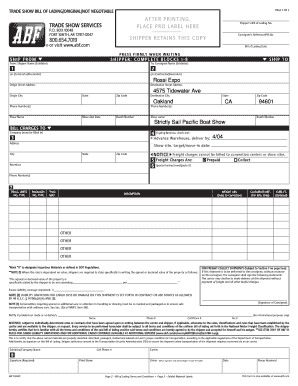
- In the first section, fill in the shipper's details, including the Shipper's Bill of Lading number, date, and contact information. This is critical to identify and reference the shipment.
- Complete the 'Ship From' and 'Ship To' fields with the name, address, city, state, and zip code of both the shipper and consignee. Make sure the details are complete and accurate.
- Indicate the show name, move-out date, and booth number in the designated areas. This will help coordinate deliveries effectively.
- For billing details, specify whether the charges are prepaid or collect, and indicate any special instructions if necessary. This will ensure proper billing.
- In the cargo details section, accurately list the handling units, packages, weights, and description of the items being shipped. Mark any hazardous materials appropriately.
- Provide necessary signatures in the designated areas. This includes the consignor's signature and print name, ensuring all legal obligations are met.
- After filling out the form, review all entries for accuracy. Once confirmed, save your changes. You can then download, print, or share the form as needed.
Complete your documents online to streamline your shipping process today!
Related links form
Select just the single point you want a label on: click once to select the series, then click again to select one point. Now when you use the right-click menu or the plus sign icon to add data labels, it will add a label only on the one point you've selected.