Loading
Get Bon Secours Mychart
How it works
-

Open form follow the instructions
-

Easily sign the form with your finger
-

Send filled & signed form or save
How to fill out the Bon Secours MyChart online
This guide provides a professional and supportive overview on how to complete the Bon Secours MyChart identification verification form. Follow these steps to ensure a seamless online experience in accessing your health information.
Follow the steps to fill out the Bon Secours MyChart identification verification form.
- Click ‘Get Form’ button to obtain the form and open it in the editor.
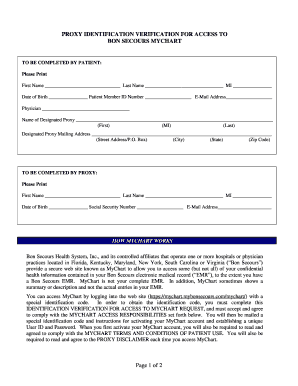
- Begin by filling out the patient’s information. Provide the first name, last name, middle initial, date of birth, patient member ID number, email address, and the name of the physician.
- Designate a proxy by filling out their first name, middle initial, last name, mailing address (including street, city, state, and zip code), and any other required contact information.
- Switch to the section for the proxy. Enter their first name, last name, middle initial, date of birth, social security number, and email address.
- Review the information provided to ensure accuracy. Misfilled information can delay the process.
- Complete the Proxy Acknowledgement by signing and dating the form. Your signature must then be verified by a notary public.
- Present one of the accepted identification documents to the notary for verification. This could be your driver’s license, a passport, or a picture ID with a social security card.
- After notarization, mail the completed form to your physician practice as indicated on the form.
- Once submitted, await the special identification code and further instructions for activating your MyChart account.
Begin completing your Bon Secours MyChart identification verification form online today.
The following code snippet sets the Text and TextAlign properties and gets the size of a LinkLabel control. dynamicLinkLabel.Text = "I am Dynamic LinkLabel"; dynamicLinkLabel.TextAlign = HorizontalAlignment.Center; int size = dynamicLinkLabel.TextLength;
Industry-leading security and compliance
US Legal Forms protects your data by complying with industry-specific security standards.
-
In businnes since 199725+ years providing professional legal documents.
-
Accredited businessGuarantees that a business meets BBB accreditation standards in the US and Canada.
-
Secured by BraintreeValidated Level 1 PCI DSS compliant payment gateway that accepts most major credit and debit card brands from across the globe.