Loading
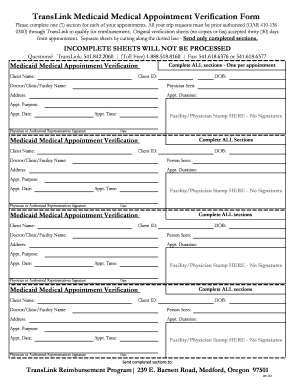
Get Translink Medicaid Medical Appointment Verification Form - Rvtd
How it works
-

Open form follow the instructions
-

Easily sign the form with your finger
-

Send filled & signed form or save
How to fill out the TransLink Medicaid Medical Appointment Verification Form - Rvtd online
Filling out the TransLink Medicaid Medical Appointment Verification Form - Rvtd online is essential for ensuring you receive reimbursement for your medical transportation. This guide provides clear, step-by-step instructions to help you accurately complete the form.
Follow the steps to successfully fill out the form online.
- Click ‘Get Form’ button to obtain the form and open it in the editor.
- Fill in the client name field with the name of the person seeking medical services.
- Enter the client ID, which is typically found on their Medicaid card.
- Provide the date of birth (DOB) of the client in the specified format.
- Complete the fields for the doctor, clinic, or facility name where the appointment occurs.
- Indicate the physician seen at the appointment.
- Input the address of the medical facility associated with the appointment.
- Specify the appointment duration in hours and minutes.
- Clearly state the purpose of the appointment in the provided field.
- Fill in the date and time of the appointment.
- Have the physician or authorized representative sign in the designated area.
- Affix the facility or physician stamp in the appropriate section without signatures.
- Ensure all sections are completed before submitting. Incomplete sheets will not be processed.
- Cut along the dotted lines to separate individual sections for each appointment and send only completed sections to the TransLink address provided.
- Finally, users can save the changes, download, print, or share the form as needed.
Start completing the TransLink Medicaid Medical Appointment Verification Form - Rvtd online today to ensure timely reimbursement for your medical trips.
How to start a record label in 9 steps Structure your label. Determine the structure under which you intend to create your record label. ... Research the market. ... Assess your finances. ... Define your label's goals. ... Pick a name. ... Purchase equipment. ... Hire staff. ... Search for musicians.
Industry-leading security and compliance
US Legal Forms protects your data by complying with industry-specific security standards.
-
In businnes since 199725+ years providing professional legal documents.
-
Accredited businessGuarantees that a business meets BBB accreditation standards in the US and Canada.
-
Secured by BraintreeValidated Level 1 PCI DSS compliant payment gateway that accepts most major credit and debit card brands from across the globe.