Loading
Form preview
  • US Legal Forms
  • Form Library
  • More Forms
  • More Uncategorized Forms
  • 888 346 5701

Get 888 346 5701

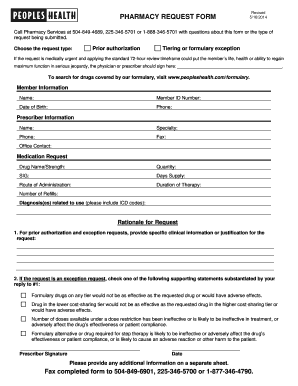
PHARMACY REQUEST FORM Revised 5/16/2014 Call Pharmacy Services at 504-849-4689, 225-346-5701 or 1-888-346-5701 with questions about this form or the type of request being submitted. Choose the request.

How it works

  1. Open form

    Open form follow the instructions

  2. Easily sign form

    Easily sign the form with your finger

  3. Share form

    Send filled & signed form or save

How to fill out the 888 346 5701 online

Filling out the 888 346 5701 form is essential for submitting pharmacy requests such as prior authorizations or formulary exceptions. This guide will provide you with a step-by-step approach to ensure that you complete the form accurately and efficiently.

Follow the steps to accurately complete the form.

  1. Press the ‘Get Form’ button to access the document and open it in your selected interface.
  2. Begin by selecting the request type. You will need to check either 'Prior authorization' or 'Tiering or formulary exception' based on your needs.
  3. If the request is urgent, ensure the physician or prescriber signs where indicated to expedite the review.
  4. Fill out the member information section, including their name, member ID number, date of birth, and phone number.
  5. Complete the prescriber information section with the prescriber's name, specialty, phone number, fax number, and office contact details.
  6. In the medication request section, provide the drug name, strength, quantity required, SIG (directions), days supply, route of administration, duration of therapy, and the number of refills needed.
  7. List the diagnosis or diagnoses related to the medication request, including any applicable ICD codes.
  8. For prior authorization and exception requests, provide detailed clinical information or reasoning for the request.
  9. If applicable, select one of the supporting statements regarding formulary alternatives to justify the request.
  10. Ensure the prescriber signs and dates the form at the designated location.
  11. If additional information is necessary, prepare a separate sheet to include with the form.
  12. After completing the form, you can save your changes, download it, or print it. Finally, fax the completed form to the appropriate number.

Complete your pharmacy request form online to ensure timely processing.

Get form

Experience a faster way to fill out and sign forms on the web. Access the most extensive library of templates available.
Get form

Related content

Formulary Exception/Prior Authorization Request...
PLEASE FAX COMPLETED FORM TO 1-888-836-0730. I attest that the medication requested is...
Learn more
LIMS Online Report Portal
+ Summaries Hole Summary Hole Summary List Core Summary Section Summary + Drilling Reports...
Learn more
FAILocations - UserManual.wiki
... 1-800-914-7772 1-800-272-0694 1-800-303-5701 1-888-255-8725 ... FAX: FAX: FAX: FAX:...
Learn more

Related links form

Ky Form 720 Instructions Form N 342 Hawaii Form N 342 Instructions 2019 Df64'colleg

Questions & Answers

Get answers to your most pressing questions about US Legal Forms API.

Contact support

Solution with the CSS :checked pseudo-class After that, you can style the selected <label> element differently. Use the CSS :checked pseudo-class and the adjacent sibling selector (+). This will apply to any label that directly follows a checked radio button.

Each radio button should have a <label> . Associate the two by matching the <label> 's for attribute to the <input> 's id attribute.

To label a radio button, add a <label> element after the <input> element and insert a for attribute with the same value as the id of the associated <input> element. Then, write your label text in the <label> tag.

The fieldset / legend element combination is the preferred technique for providing a grouping information and label for a related group of radio buttons.

The <input type="radio"> defines a radio button.

ID's should not be repeated not only on radio buttons, but for any elements.

Radio buttons let a user select only one of a limited number of choices: <input type="radio" id="html" name="fav_language" value="HTML"> <label for="html">HTML</label><br>

To label a radio button, add a <label> element after the <input> element and insert a for attribute with the same value as the id of the associated <input> element. Then, write your label text in the <label> tag. While using <label> isn't strictly necessary, it's considered a best practice for two reasons.

Get This Form Now!

Use professional pre-built templates to fill in and sign documents online faster. Get access to thousands of forms.
Get form
If you believe that this page should be taken down, please follow our DMCA take down processhere.

Industry-leading security and compliance

US Legal Forms protects your data by complying with industry-specific security standards.
  • In businnes since 1997
    25+ years providing professional legal documents.
  • Accredited business
    Guarantees that a business meets BBB accreditation standards in the US and Canada.
  • Secured by Braintree
    Validated Level 1 PCI DSS compliant payment gateway that accepts most major credit and debit card brands from across the globe.
Get 888 346 5701
Get form
  • Adoption
  • Bankruptcy
  • Contractors
  • Divorce
  • Home Sales
  • Employment
  • Identity Theft
  • Incorporation
  • Landlord Tenant
  • Living Trust
  • Name Change
  • Personal Planning
  • Small Business
  • Wills & Estates
  • Packages A-Z
  • Affidavits
  • Bankruptcy
  • Bill of Sale
  • Corporate - LLC
  • Divorce
  • Employment
  • Identity Theft
  • Internet Technology
  • Landlord Tenant
  • Living Wills
  • Name Change
  • Power of Attorney
  • Real Estate
  • Small Estates
  • Wills
  • All Forms
  • Forms A-Z
  • Form Library
  • Legal Hub
  • About Us
  • Help Portal
  • Legal Resources
  • Blog
  • Affiliates
  • Contact Us
  • Delete My Account
  • Site Map
  • Industries
  • Forms in Spanish
  • Localized Forms
  • State-specific Forms
  • Forms Kit
  • Real Estate Handbook
  • All Guides
  • Notarize
  • Incorporation services
  • For Consumers
  • For Small Business
  • For Attorneys
  • USLegal
  • FormsPass
  • pdfFiller
  • signNow
  • altaFlow
  • DocHub
  • Instapage
Form Packages
  • Adoption
  • Bankruptcy
  • Contractors
  • Divorce
  • Home Sales
  • Employment
  • Identity Theft
  • Incorporation
  • Landlord Tenant
  • Living Trust
  • Name Change
  • Personal Planning
  • Small Business
  • Wills & Estates
  • Packages A-Z
Form Categories
  • Affidavits
  • Bankruptcy
  • Bill of Sale
  • Corporate - LLC
  • Divorce
  • Employment
  • Identity Theft
  • Internet Technology
  • Landlord Tenant
  • Living Wills
  • Name Change
  • Power of Attorney
  • Real Estate
  • Small Estates
  • Wills
  • All Forms
  • Forms A-Z
  • Form Library
Customer Service
  • Legal Hub
  • About Us
  • Help Portal
  • Legal Resources
  • Blog
  • Affiliates
  • Contact Us
  • Delete My Account
  • Site Map
  • Industries
  • Forms in Spanish
  • Localized Forms
  • State-specific Forms
  • Forms Kit
Legal Guides
  • Real Estate Handbook
  • All Guides
Prepared for you
  • Notarize
  • Incorporation services
Our Customers
  • For Consumers
  • For Small Business
  • For Attorneys
Our Sites
  • USLegal
  • FormsPass
  • pdfFiller
  • signNow
  • altaFlow
  • DocHub
  • Instapage
Social Media
Call us now toll free:
+1 833 426 79 33
As seen in:
© Copyright 1999-2026 airSlate Legal Forms, Inc. 3720 Flowood Dr, Flowood, Mississippi 39232
  • Your Privacy Choices
  • Terms of Service
  • Privacy Notice
  • Content Takedown Policy
  • Bug Bounty Program