Loading
Get Form 049 Systems Access Form - Surf Life Saving Australia
How it works
-

Open form follow the instructions
-

Easily sign the form with your finger
-

Send filled & signed form or save
How to fill out the Form 049 Systems Access Form - Surf Life Saving Australia online
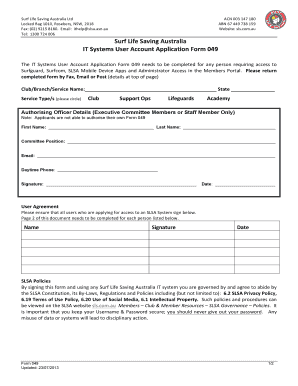
Filling out the Form 049 Systems Access Form is essential for users needing access to Surf Life Saving Australia's IT systems. This guide will provide you with clear, step-by-step instructions on completing this form online.
Follow the steps to effectively complete the Form 049 online.
- Click ‘Get Form’ button to obtain the form and open it in the editor.
- Complete the first section by entering your Club, Branch, or Service Name and State in the appropriate fields.
- Indicate the Service Type by circling one of the options: Club, Support Ops, Lifeguards, or Academy.
- Fill out the Authorising Officer Details section, ensuring that this information is entered by an Executive Committee Member or Staff Member. Include first name, last name, committee position, email, daytime phone number, signature, and date.
- In the User Agreement section, gather signatures from all users applying for access to the SLSA system. Ensure that Page 2 is completed for each individual listed.
- Choose the type of account you need to create, amend, reactivate, or deactivate by circling the appropriate option.
- Provide all necessary personal information, such as name, phone number, email, start date of access, and end date (if applicable). Make sure to circle 'No End Date' if needed.
- Select the appropriate permission level for Surfguard by circling one of the options: Full Access - Create/Edit/View, Full Access - View Only, or Custom Access.
- For Surfcom access type, circle either Operator or Administrator, and provide the default branch and any additional branches as needed.
- Complete the SLSA Mobile Applications section by circling the relevant apps and listing council names.
- Indicate whether you are a member of an SLSA organization, and if not, provide gender and date of birth.
- Choose any required administrative functions for the Members Portal by circling desired options.
- Once all sections are completed, save your changes, download, print, or share the form as required.
Start filling out your Form 049 online today to gain access to crucial Surf Life Saving Australia systems.
0:03 0:22 How do you add Data Labels for Tableau Line Chart #Shorts YouTube Start of suggested clip End of suggested clip Again gold line ends. And there you have it.MoreAgain gold line ends. And there you have it.
Industry-leading security and compliance
US Legal Forms protects your data by complying with industry-specific security standards.
-
In businnes since 199725+ years providing professional legal documents.
-
Accredited businessGuarantees that a business meets BBB accreditation standards in the US and Canada.
-
Secured by BraintreeValidated Level 1 PCI DSS compliant payment gateway that accepts most major credit and debit card brands from across the globe.