Loading
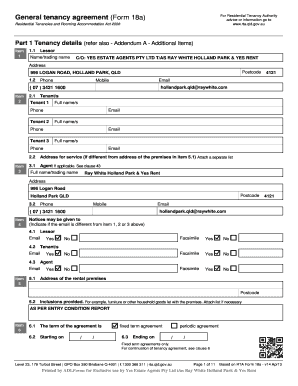
Get Ray White Holland Park Form
How it works
-

Open form follow the instructions
-

Easily sign the form with your finger
-

Send filled & signed form or save
How to fill out the Ray White Holland Park Form online
Filling out the Ray White Holland Park Form online can be a straightforward process if you follow the steps outlined in this guide. This form is essential for establishing a tenancy agreement under the Residential Tenancies and Rooming Accommodation Act. The following instructions will help you navigate each section effectively.
Follow the steps to complete your form with ease.
- Click ‘Get Form’ button to obtain the form and open it for editing.
- In Part 1, enter the tenancy details: Fill in the lessor's name or trading name, address, phone number, and email. Ensure these details are accurate.
- Next, identify all tenants by providing their full names, phone numbers, and email addresses in the appropriate sections for each tenant.
- Input the address of the rental premises, ensuring the postcode is correct. This information will identify the location of your tenancy.
- Indicate the period of the tenancy by specifying the start and end dates, along with the type of agreement (fixed term or periodic).
- Outline the payment details, including the rent amount, frequency of payment (weekly, fortnightly, or monthly), and the method of payment.
- Complete the sections related to services supplied with the premises, such as utilities, and indicate any items included with the rental, if applicable.
- For further customization, refer to Addendum A for additional items, including information about bond, pets, and any special considerations.
- Review all entered information to confirm accuracy before proceeding. This is crucial to avoid issues in the future.
- Once you have filled out the form, you can save your changes, download a copy for your records, print it, or share it as necessary.
Start completing your Ray White Holland Park Form online today to ensure a smooth rental application process.
Releases are the releases (or albums) that your songs are associated to via the song's recording(s). Releases contain multiple fields you can edit, such as Title, Artist, Label, Total tracks, Original release date, Original release year, and more.