Loading
Form preview
  • US Legal Forms
  • Form Library
  • More Forms
  • More Uncategorized Forms
  • 21 0960m 12 Form

Get 21 0960m 12 Form

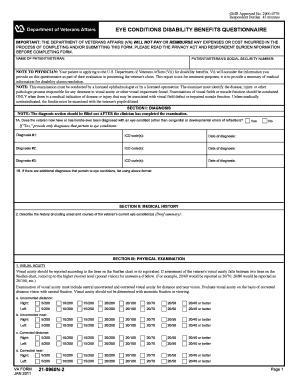
OMB Approved No. 2900-0776 Respondent Burden: 45 minutes EYE CONDITIONS DISABILITY BENEFITS QUESTIONNAIRE IMPORTANT: THE DEPARTMENT OF VETERANS AFFAIRS (VA) WILL NOT PAY OR REIMBURSE ANY EXPENSES.

How it works

  1. Open form

    Open form follow the instructions

  2. Easily sign form

    Easily sign the form with your finger

  3. Share form

    Send filled & signed form or save

How to fill out the 21 0960m 12 Form online

Completing the 21 0960m 12 Form online is an important step for individuals applying for disability benefits regarding eye conditions. This guide provides a clear and structured approach to filling out the form, ensuring that you understand each section thoroughly.

Follow the steps to fill out the form accurately and efficiently.

  1. Click ‘Get Form’ button to obtain the form and open it in the appropriate platform.
  2. Enter the name of the patient or veteran clearly in the designated field. This should match the identification used for the claim.
  3. Provide the patient or veteran's social security number in the specified area. Ensure that the number is accurate to avoid processing delays.
  4. For Section I, Diagnosis, answer whether the veteran has ever been diagnosed with an eye condition other than congenital issues. If yes, list all applicable diagnoses and corresponding ICD codes and dates.
  5. In Section II, Medical History, briefly summarize the history of the veteran's eye condition, including onset and progression.
  6. Proceed to Section III for the Physical Examination. Fill in the visual acuity fields following the Snellen chart guidelines. Ensure to differentiate between uncorrected and corrected distances.
  7. Complete any necessary sections regarding visual field defects or conditions, detailing findings as required.
  8. Continue through Sections IV and V to document any identified eye conditions, their impacts, and whether they lead to scarring or disfigurement.
  9. Finish by reviewing Sections VI through IX thoroughly, providing details on incapacitating episodes, functional impact, and the physician's certification.
  10. After filling out the form, save your changes, and choose to download, print, or share the form as needed.

Begin filling out the 21 0960m 12 Form online today to ensure your application is processed smoothly.

Get form

Experience a faster way to fill out and sign forms on the web. Access the most extensive library of templates available.
Get form

Related content

VA Form 21-0960M-12 - Reginfo.gov
VA FORM. JAN 2011. 21-0960M-12. SECTION IV - INITIAL RANGE OF MOTION (ROM) MEASUREMENTS...
Learn more
Appendix M: Neck (Cervical Spine) Conditions...
See https://www.vba.va.gov/pubs/forms/VBA-21-0960M-13-ARE.pdf (accessed March 27, 2019)...
Learn more

Related links form

Soleus Air Pe3 12r 03 Parts Caljic Form Child Care Receipt Printable Pdf Roommate Agreement Form

Questions & Answers

Get answers to your most pressing questions about US Legal Forms API.

Contact support

Can a Rotator Cuff Injury Lead to Permanent Disability? In some cases, yes. Severe rotator cuff injuries involve a significant or complete tear in one or more structures in the rotator cuff. A severe rotator cuff tear can lead to a permanent loss in a person's range of motion.

The Veteran's impingement syndrome of the right and left shoulder has been rated as 40 percent and 30 percent disabling, respectively, under Diagnostic Code 5201-5203, which rates limitation of motion of the arm and impairment of the clavicle or scapula.

Some workers with torn rotator cuffs have jobs that do not require much physical exertion. Physical therapy exercises may be enough for these workers to manage their symptoms and continue working.

If your shoulder impairments are severe enough, you might qualify for Social Security disability benefits and Supplemental Security Income benefits. In order to pay you benefits, the Social Security Administration (SSA) determines whether your shoulder condition prevents you from working for at least one year.

You can get a 20%, 30%, 40%, or 50% rating for a torn rotator cuff. The VA might also use diagnostic code 5304 to assign the rating if the injury affects the shoulder muscles. The ratings are 0%, 10%, 20%, and 30% depending on severity and whether the injury is to your dominant or non-dominant arm.

Rotator cuff surgery is rated based on the severity of the pain and the thickness of the rotator cuff tear. Most often, VA rates this condition as 10 or 20 percent disabling.

Some people may be able to qualify for disability benefits after a serious rotator cuff tear, but the specifics depend on each person's medical records. In order to receive Social Security Disability, the applicant's disability must be expected to persist for at least 12 months.

Many shoulder pain sufferers qualify for Social Security disability because they have a “major dysfunction of a joint.” In order to qualify pursuant to this Blue Book listing, a claimant must show that he has one of the following conditions: Partial shoulder dislocation. Partial or full fusing of the shoulder joints.

Get This Form Now!

Use professional pre-built templates to fill in and sign documents online faster. Get access to thousands of forms.
Get form
If you believe that this page should be taken down, please follow our DMCA take down processhere.
Get 21 0960m 12 Form
Get form
  • Adoption
  • Bankruptcy
  • Contractors
  • Divorce
  • Home Sales
  • Employment
  • Identity Theft
  • Incorporation
  • Landlord Tenant
  • Living Trust
  • Name Change
  • Personal Planning
  • Small Business
  • Wills & Estates
  • Packages A-Z
  • Affidavits
  • Bankruptcy
  • Bill of Sale
  • Corporate - LLC
  • Divorce
  • Employment
  • Identity Theft
  • Internet Technology
  • Landlord Tenant
  • Living Wills
  • Name Change
  • Power of Attorney
  • Real Estate
  • Small Estates
  • Wills
  • All Forms
  • Forms A-Z
  • Form Library
  • Legal Hub
  • About Us
  • Help Portal
  • Legal Resources
  • Blog
  • Affiliates
  • Contact Us
  • Delete My Account
  • Site Map
  • Industries
  • Forms in Spanish
  • Localized Forms
  • State-specific Forms
  • Forms Kit
  • Real Estate Handbook
  • All Guides
  • Notarize
  • Incorporation services
  • For Consumers
  • For Small Business
  • For Attorneys
  • USLegal
  • FormsPass
  • pdfFiller
  • signNow
  • altaFlow
  • DocHub
  • Instapage
Form Packages
  • Adoption
  • Bankruptcy
  • Contractors
  • Divorce
  • Home Sales
  • Employment
  • Identity Theft
  • Incorporation
  • Landlord Tenant
  • Living Trust
  • Name Change
  • Personal Planning
  • Small Business
  • Wills & Estates
  • Packages A-Z
Form Categories
  • Affidavits
  • Bankruptcy
  • Bill of Sale
  • Corporate - LLC
  • Divorce
  • Employment
  • Identity Theft
  • Internet Technology
  • Landlord Tenant
  • Living Wills
  • Name Change
  • Power of Attorney
  • Real Estate
  • Small Estates
  • Wills
  • All Forms
  • Forms A-Z
  • Form Library
Customer Service
  • Legal Hub
  • About Us
  • Help Portal
  • Legal Resources
  • Blog
  • Affiliates
  • Contact Us
  • Delete My Account
  • Site Map
  • Industries
  • Forms in Spanish
  • Localized Forms
  • State-specific Forms
  • Forms Kit
Legal Guides
  • Real Estate Handbook
  • All Guides
Prepared for you
  • Notarize
  • Incorporation services
Our Customers
  • For Consumers
  • For Small Business
  • For Attorneys
Our Sites
  • USLegal
  • FormsPass
  • pdfFiller
  • signNow
  • altaFlow
  • DocHub
  • Instapage
Social Media
Call us now toll free:
+1 833 426 79 33
As seen in:
© Copyright 1999-2026 airSlate Legal Forms, Inc. 17 Station Street, Suite 303, Brookline, MA 02445
  • Your Privacy Choices
  • Terms of Service
  • Privacy Notice
  • Content Takedown Policy
  • Bug Bounty Program