Loading
Get C Shnet
How it works
-

Open form follow the instructions
-

Easily sign the form with your finger
-

Send filled & signed form or save
How to fill out the C Shnet online
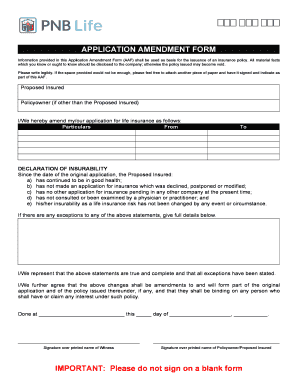
Filling out the C Shnet, or Application Amendment Form, online can be a straightforward process if you follow these guidelines. This guide will provide you with detailed instructions to help ensure that you complete the form accurately and efficiently.
Follow the steps to effectively complete the C Shnet online.
- Press the ‘Get Form’ button to access the form and open it in your chosen online editor.
- Begin by entering the name of the proposed insured in the designated field. Ensure that the spelling is correct and legible.
- If the policy owner is different from the proposed insured, fill in their name in the respective section. This information is crucial for identifying the parties involved.
- In the section labeled 'I/We hereby amend my/our application for life insurance as follows,' clearly outline the particulars of the amendment. Specify the changes from the original application in the 'From' and 'To' fields.
- Proceed to the 'Declaration of Insurability' section. Carefully review each statement to determine if they apply to the proposed insured. Mark the statements that are true.
- If any of the statements in the declaration are not true, provide detailed information in the space allocated below the declaration. Be honest and thorough as this could affect the insurance policy.
- In the signature section, ensure that the policy owner or proposed insured signs the document over their printed name, along with a witness if required. This validates the changes made.
- Finally, review the completed form for any errors or omissions. Once confirmed, you can save the changes, download, print, or share the form as necessary.
Complete and submit your documents online for a hassle-free experience.
You can have it unlocked by your company's designated user administrator or you can also ask assistance through our Customer Service Representative at telephone number 573-8888 or send an email to ibs.mail@pnb.com.ph and pnbcashnet@pnb.com.ph. Who shall we contact if we have concerns or problems with PNB C@shnet?