Loading
Get Wawanesa Canada Insurance Statement Form
How it works
-

Open form follow the instructions
-

Easily sign the form with your finger
-

Send filled & signed form or save
How to fill out the Wawanesa Canada Insurance Statement Form online
Completing the Wawanesa Canada Insurance Statement Form online can streamline your claim process and ensure you submit all necessary information efficiently. This guide provides clear, step-by-step instructions to help you fill out the form accurately.
Follow the steps to complete your insurance statement form effectively.
- Click ‘Get Form’ button to obtain the form and open it in the editor.
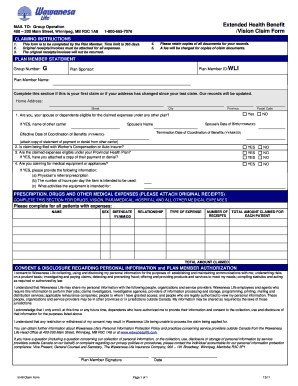
- Begin by filling out the 'Plan Member Statement' section. Enter the group number, plan member ID, and the name of the plan sponsor. If this is your first claim or if your address has changed, be sure to update your home address details.
- Answer the eligibility questions concerning other insurance plans for you, your spouse, or dependents. If applicable, provide the spouse's date of birth and name, along with details regarding coordination of benefits.
- Indicate if you are filing claims with Worker’s Compensation or an auto insurer. Also, confirm whether the claimed expenses are covered under your provincial health plan.
- Complete the section for medical equipment or appliances if applicable. Provide specific information such as a physician’s prescription, hours of intended use per day, and the purpose of the equipment.
- For claims related to prescription drugs and other medical expenses, fill out the respective section. List all patients with expenses, including their name, sex, birthdate, relationship to the plan member, type of expense, number of receipts, and total amount claimed for each patient.
- Review the consent and disclosure regarding personal information. Ensure you understand how Wawanesa Life will use and share your information.
- Sign and date the claim form at the bottom to confirm the authenticity of the information provided.
- Once all sections are complete, save changes, download a copy for your records, and print the form if necessary for submission.
Start your document filing today and complete your Wawanesa Canada Insurance Statement Form online.
You can file your claim in two ways — either online or over the phone by calling 888-WAWA-CLAIM (929-2252). Both methods are available 24 hours a day, 7 days a week.