Loading
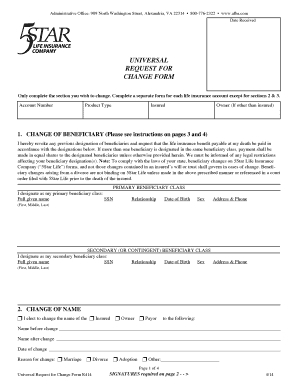
Get Afba Insurance Beneficiary Form
How it works
-

Open form follow the instructions
-

Easily sign the form with your finger
-

Send filled & signed form or save
How to fill out the Afba Insurance Beneficiary Form online
Filling out the Afba Insurance Beneficiary Form online can be a straightforward process when you have clear guidance. This form is essential for designating beneficiaries, changing personal information, and managing your insurance account effectively.
Follow the steps to complete the Afba Insurance Beneficiary Form online.
- Press the ‘Get Form’ button to access and open the Afba Insurance Beneficiary Form in your preferred online editor.
- Start by entering your account number and the product type at the top of the form. Ensure that these details are accurate to avoid confusion.
- In the 'Change of Beneficiary' section, revoke previous beneficiary designations and fill in the details of your primary beneficiaries. Include full names, Social Security numbers, their relationship to you, and dates of birth.
- Designate your secondary (or contingent) beneficiaries in the appropriate section. Use the same format as with primary beneficiaries to ensure clarity.
- If you wish to change your name, complete the 'Change of Name' section, providing both the name before and after the change, along with the reason for the change.
- Fill out the 'Change of Address' section only if necessary. Provide your current address and phone numbers for contact purposes.
- In the 'Ownership Change' section, enter the details of the new owner if applicable. Ensure that signatures from both the current and the new owner are included.
- If applicable, specify your request to decrease coverage in the respective section. Clearly state the new coverage amount you desire.
- Complete any requests for lost statements or duplicate certificates by providing the necessary information in the specified sections.
- Finally, sign and date the form. Ensure all required signatures are included before submitting your completed form to Afba Insurance.
- Once completed, save your changes, and choose to download, print, or share the form as needed.
Take action now and complete your Afba Insurance Beneficiary Form online to ensure your beneficiaries are correctly designated.
Provide the following information on the beneficiary designation: The full name of the trust as it shows on the trust document. The date the trust was created. The name of the trustee, followed by the word “trustee”, or if you cannot provide a trustee, ETF may accept another contact person. The trustee's address.