Loading
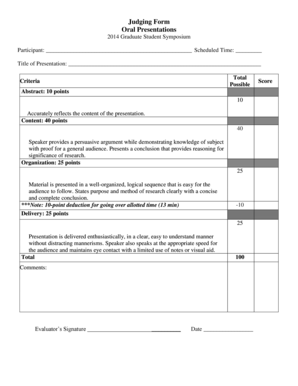
Get Oral Presentation Judging Form (pdf File) - Grad Uni
How it works
-

Open form follow the instructions
-

Easily sign the form with your finger
-

Send filled & signed form or save
How to use or fill out the Oral Presentation Judging Form (PDF File) - Grad Uni online
Filling out the Oral Presentation Judging Form is an essential part of evaluating presentations at Grad Uni's Graduate Student Symposium. This guide provides users with clear, step-by-step instructions to ensure a smooth and accurate completion of the form online.
Follow the steps to successfully complete the judging form for oral presentations.
- Press the ‘Get Form’ button to download the Oral Presentation Judging Form and open it using your preferred PDF editor.
- In the 'Participant' field, enter the name of the participant being evaluated.
- Fill in the 'Scheduled Time' field with the time block assigned for the presentation.
- In the 'Title of Presentation' section, input the title of the participant's presentation.
- For 'Abstract,' assess the accuracy of the abstract in reflecting the content. Allocate points up to 10 based on this criterion.
- Evaluate the 'Content' by providing a score out of 40 points, considering the persuasiveness of the argument and the presenter’s knowledge.
- Assess 'Organization' by scoring up to 25 points for the logical sequence and clarity of purpose and conclusion.
- Evaluate the 'Delivery' of the presentation, awarding up to 25 points while noting any deductions for time overages.
- Total up the points assigned in each criterion to reach a maximum score of 100.
- In the 'Comments' section, provide any relevant feedback or observations regarding the performance.
- Sign and date the form in the respective 'Evaluator’s Signature' and 'Date' fields.
- Once all fields are complete, save your changes, and you have the option to download, print, or share the completed form as needed.
Start filling out the Oral Presentation Judging Form online today to support our presenters!
ORAL PRESENTATION JUDGING CRITERIA Clear enunciation and pronunciation; no stuttering i.e., 'um', 'er', 'you know', ... Slides legible from back of room, well labeled, not overcrowded. ... Effective use of time: reasonable amount of time for intro, methods, results. ... Stays within allotted time with time available for questions.
Industry-leading security and compliance
US Legal Forms protects your data by complying with industry-specific security standards.
-
In businnes since 199725+ years providing professional legal documents.
-
Accredited businessGuarantees that a business meets BBB accreditation standards in the US and Canada.
-
Secured by BraintreeValidated Level 1 PCI DSS compliant payment gateway that accepts most major credit and debit card brands from across the globe.