Loading
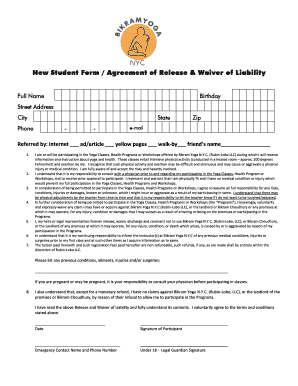
Get Agreement Of Release And Waiver Of Liability - Bikram Yoga Nyc
How it works
-

Open form follow the instructions
-

Easily sign the form with your finger
-

Send filled & signed form or save
How to fill out the Agreement Of Release And Waiver Of Liability - Bikram Yoga NYC online
Completing the Agreement Of Release And Waiver Of Liability for Bikram Yoga NYC is an essential step for participants looking to engage in yoga classes and related programs. This guide provides clear, step-by-step instructions to ensure a smooth and complete online submission of the form.
Follow the steps to fill out the form effectively.
- Click the ‘Get Form’ button to access the Agreement of Release and Waiver of Liability and open it in your preferred online editor.
- Enter your full name in the designated field. This information is required to identify you as the participant.
- Provide your birthday in the specified format to verify your age for participation.
- Fill in your street address, city, state, and zip code to establish your contact information.
- Input your phone number using the appropriate format to ensure accurate communication.
- Enter your email address, which will be used for any correspondence related to your participation.
- Indicate how you were referred to Bikram Yoga NYC by selecting the relevant option or specifying a friend's name.
- Read the liability waiver section carefully. You must acknowledge and understand the risks associated with participating in yoga classes and health programs.
- List any prior medical conditions, injuries, or surgeries that may impact your participation in the programs.
- Sign and date the form to confirm your agreement and acceptance of the terms outlined in the waiver.
- If you are under 18, a legal guardian must sign the form. Make sure to include their signature in the appropriate section.
- Finally, review all your entries for accuracy. Once confirmed, you can save changes, download, print, or share the completed form as needed.
Complete your Agreement Of Release And Waiver Of Liability online today!
To put a blank page into your Word document, place the cursor where you want the new page to begin and then click Insert > Blank Page. The blank page opens, ready for whatever you want to add. Another option when you need a little space is to insert a page break.
Industry-leading security and compliance
US Legal Forms protects your data by complying with industry-specific security standards.
-
In businnes since 199725+ years providing professional legal documents.
-
Accredited businessGuarantees that a business meets BBB accreditation standards in the US and Canada.
-
Secured by BraintreeValidated Level 1 PCI DSS compliant payment gateway that accepts most major credit and debit card brands from across the globe.