Loading
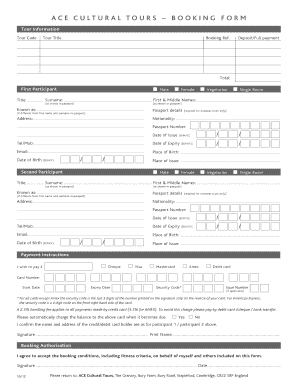
Get Ace Cultural Tours Booking Form - Royal Academy Of Arts - Static Royalacademy Org
How it works
-

Open form follow the instructions
-

Easily sign the form with your finger
-

Send filled & signed form or save
How to use or fill out the ACE CulTurAl Tours BooKING ForM - Royal Academy Of Arts - Static Royalacademy Org online
Filling out the ACE Cultural Tours booking form is an important step in securing your place for a tour offered by the Royal Academy of Arts. This guide provides a comprehensive walkthrough to assist you in successfully completing the form online, ensuring all necessary information is properly submitted.
Follow the steps to complete your booking form effectively.
- Click ‘Get Form’ button to obtain the form online and open it in your preferred document editor.
- Fill out the tour information section. Start by entering the tour code and tour title, followed by your booking reference and payment details. Indicate whether you are making a deposit or full payment.
- Complete the first participant's details. Specify their gender, dietary preferences, accommodation needs, title, surname, first and middle names as shown in their passport, and any nickname they are known by.
- Provide passport details, including nationality, passport number, date of issue, expiration date, contact number, email address, place of birth, and place of issue.
- Repeat step 3 and step 4 for the second participant if they are joining. Remember that this section is only required for overseas tours.
- Then, move to the payment instructions. Indicate your preferred payment method and enter the appropriate details, including card type and number, expiration date, security code, and whether you wish to automatically charge the balance.
- Sign and print your name as needed to authorize the booking and acceptance of the associated terms and conditions.
- Review the booking authorization section and confirm that you agree to the booking conditions. Include your signature and the date.
- Save your changes, download, print, or share the completed form as instructed.
Complete your ACE Cultural Tours booking form online to secure your tour.
The <br> tag is a simple and easy way to add line breaks to your HTML code. By adding the <br> tag wherever you want a line break to appear, you can make your code more readable and easier to understand.
Industry-leading security and compliance
US Legal Forms protects your data by complying with industry-specific security standards.
-
In businnes since 199725+ years providing professional legal documents.
-
Accredited businessGuarantees that a business meets BBB accreditation standards in the US and Canada.
-
Secured by BraintreeValidated Level 1 PCI DSS compliant payment gateway that accepts most major credit and debit card brands from across the globe.