Loading
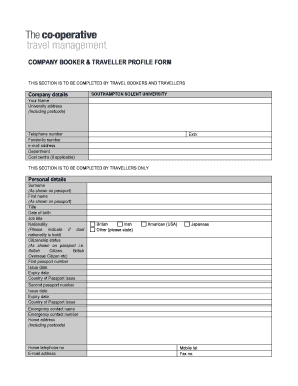
Get Traveller Profile Form (co-operative) - Portal - Southampton Solent ...
How it works
-

Open form follow the instructions
-

Easily sign the form with your finger
-

Send filled & signed form or save
How to fill out the Traveller Profile Form (Co-operative) - Portal - Southampton Solent ... online
Filling out the Traveller Profile Form is an important step in ensuring smooth travel arrangements through Southampton Solent University. This guide provides a clear, step-by-step approach to help you complete the form accurately and efficiently.
Follow the steps to complete your Traveller Profile Form online.
- Press the ‘Get Form’ button to access and open the Traveller Profile Form in the designated editor.
- Begin by completing the company details section. Input the university's name and provide your contact information, including your name, email address, telephone number, and department. If applicable, include your cost centre and extension number.
- Fill out the personal details section. Enter your surname and first name exactly as they appear on your passport. Include your title, date of birth, job title, nationality, and citizenship status. If you possess a second passport, provide the relevant details for both passports, including the passport numbers, issue dates, expiry dates, and countries of issue.
- Complete the emergency contact information by providing the name and phone number of your chosen emergency contact, as well as your home address and alternate contact information, including home telephone and email address.
- In the booking contact and ticket delivery section, input the name and phone number of the booking contact, and provide the ticket delivery address if it differs from your home address.
- Address your personal requirements and memberships. Specify your seating preference on the aircraft, dietary requirements, and any memberships related to airlines, hotels, or car rentals. Include preferences for hotel and car rentals as well.
- If you have additional information that may be relevant to your travel arrangements, include any further details in the specified section.
- Review the completed form for any errors or missing information. Once satisfied, you can save your changes. If needed, download, print, or share the form electronically.
- Finally, email the completed form to the designated address: travel.procurement@solent.ac.uk, ensuring that all information is secure and confidential.
Start filling out your Traveller Profile Form online today to ensure a smooth travel experience!
Attest/Attestation: Allows the employee to confirm that they did or did not take an uninterrupted meal break during their work shift.
Industry-leading security and compliance
US Legal Forms protects your data by complying with industry-specific security standards.
-
In businnes since 199725+ years providing professional legal documents.
-
Accredited businessGuarantees that a business meets BBB accreditation standards in the US and Canada.
-
Secured by BraintreeValidated Level 1 PCI DSS compliant payment gateway that accepts most major credit and debit card brands from across the globe.