We use cookies to improve security, personalize the user experience, enhance our marketing activities (including cooperating with our marketing partners) and for other business use.
Click "here" to read our Cookie Policy. By clicking "Accept" you agree to the use of cookies. Read less
Read more
Accept
Loading
Form preview
  • US Legal Forms
  • Form Library
  • More Forms
  • More Uncategorized Forms
  • Official Carten 100 Sponsorship Form - Carten100

Get Official Carten 100 Sponsorship Form - Carten100

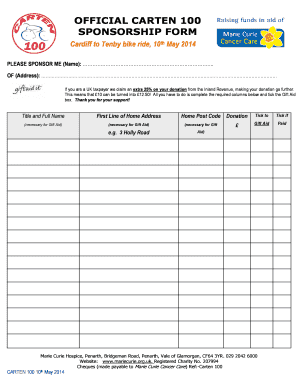
OFFICIAL CARTEN 100 SPONSORSHIP FORM Cardiff to Tenby bike ride, 10th May 2014 PLEASE SPONSOR ME (Name): .. OF (Address): . If you are a UK taxpayer we claim an extra 25% on your donation from the.

How it works

  1. Open form

    Open form follow the instructions

  2. Easily sign form

    Easily sign the form with your finger

  3. Share form

    Send filled & signed form or save

How to fill out the OFFICIAL CARTEN 100 SPONSORSHIP FORM - CARTEN100 online

Completing the OFFICIAL CARTEN 100 SPONSORSHIP FORM online is straightforward and can help maximize your contribution to this charitable cause. This guide provides you with clear, step-by-step instructions to ensure that your form is filled out accurately and efficiently.

Follow the steps to successfully complete the form.

  1. Click the ‘Get Form’ button to retrieve the sponsorship form and open it in your preferred digital document editor.
  2. Begin by entering the name of the person you are sponsoring in the designated field marked 'PLEASE SPONSOR ME (Name):'. Ensure that the spelling is correct to avoid any issues with registration or recognition.
  3. Next, fill in the complete address of the sponsor in the 'OF (Address):' field. This includes the first line of the home address and the home postcode, both of which are essential for the Gift Aid claim.
  4. Now, enter the donation amount in the 'Donation' field. This amount will be used to calculate the potential Gift Aid benefit to the charity.
  5. If you are a UK taxpayer, ensure to tick the 'Gift Aid' box, which allows the charity to claim an additional 25% on your donation from the government.
  6. Once all required fields are filled out, review your information for accuracy, ensuring all data matches your financial records.
  7. Upon completion, you can choose to save your changes, download the form, print it out, or share it as necessary. Make sure to keep a copy for your records.

Start completing the OFFICIAL CARTEN 100 SPONSORSHIP FORM online now to make a difference!

Get form

Experience a faster way to fill out and sign forms on the web. Access the most extensive library of templates available.
Get form

Related links form

DASAIMs Vejledning Ansgning Hoveduddannelse E 2015 Endocrinology Referral Request Form - Choc MCC-008 Borrowers Closing Affidavit - GSFA SERS Membership Record - Trumbull County Educational Service

Questions & Answers

Get answers to your most pressing questions about US Legal Forms API.

Contact support

Has four default steps for Kanban boards: Backlog, Selected for Development, In Progress, Done.

Do the following steps to add and edit your columns. Open your Kanban board. Select Configure team settings to configure the board and set general team settings. Select Columns and then a column tab to see all the settings that you can modify.

The default columns on a Kanban board are Backlog, Selected for Development, In Progress, and Done.

Basic Kanban Board Example The basic Kanban board is a great start for teams and individuals who are new to the Kanban concept. It usually consists of 3 to 4 columns without any complications.

0:38 3:50 Add a Column on Scrum Board - Jira Basics Tutorial 2020 - YouTube YouTube Start of suggested clip End of suggested clip So I have my concert to do in progress and done I want I have a new QA coming so I want to put in QAMoreSo I have my concert to do in progress and done I want I have a new QA coming so I want to put in QA between in progress and up so how do I do that I click on this three dots here. And I go to a board

The typical Kanban board has three columns: To Do, Doing, and Done and in Kanbanize the columns are as follows: Requested, In Progress, and Done. They divide the Kanban board vertically, and each of them represents a different stage of a workflow.

At the very least, agile boards have three columns — 'To Do,' 'In Progress,' and 'Done. ' But an agile board can have more sections depending on the project and whether the team is using the Scrum or Kanban framework.

0:00 0:59 How to Add a New Status to a Jira Workflow - YouTube YouTube Start of suggested clip End of suggested clip Today's question is can we add a new status to the default workflow in jira software. Yes you doMoreToday's question is can we add a new status to the default workflow in jira software. Yes you do need to be an administrator to do this you're going to go to whatever project you want all you got to

Get This Form Now!

Use professional pre-built templates to fill in and sign documents online faster. Get access to thousands of forms.
Get form
If you believe that this page should be taken down, please follow our DMCA take down processhere.

Industry-leading security and compliance

US Legal Forms protects your data by complying with industry-specific security standards.
  • In businnes since 1997
    25+ years providing professional legal documents.
  • Accredited business
    Guarantees that a business meets BBB accreditation standards in the US and Canada.
  • Secured by Braintree
    Validated Level 1 PCI DSS compliant payment gateway that accepts most major credit and debit card brands from across the globe.
Get OFFICIAL CARTEN 100 SPONSORSHIP FORM - CARTEN100
Get form
Form Packages
Adoption
Bankruptcy
Contractors
Divorce
Home Sales
Employment
Identity Theft
Incorporation
Landlord Tenant
Living Trust
Name Change
Personal Planning
Small Business
Wills & Estates
Packages A-Z
Form Categories
Affidavits
Bankruptcy
Bill of Sale
Corporate - LLC
Divorce
Employment
Identity Theft
Internet Technology
Landlord Tenant
Living Wills
Name Change
Power of Attorney
Real Estate
Small Estates
Wills
All Forms
Forms A-Z
Form Library
Customer Service
Terms of Service
Privacy Notice
Legal Hub
Content Takedown Policy
Bug Bounty Program
About Us
Help Portal
Legal Resources
Blog
Affiliates
Contact Us
Delete My Account
Site Map
Industries
Forms in Spanish
Localized Forms
State-specific Forms
Forms Kit
Legal Guides
Real Estate Handbook
All Guides
Prepared for You
Notarize
Incorporation services
Our Customers
For Consumers
For Small Business
For Attorneys
Our Sites
US Legal Forms
USLegal
FormsPass
pdfFiller
signNow
airSlate WorkFlow
DocHub
Instapage
Social Media
Call us now toll free:
+1 833 426 79 33
As seen in:
  • USA Today logo picture
  • CBC News logo picture
  • LA Times logo picture
  • The Washington Post logo picture
  • AP logo picture
  • Forbes logo picture
© Copyright 1997-2025
airSlate Legal Forms, Inc.
3720 Flowood Dr, Flowood, Mississippi 39232
Form Packages
Adoption
Bankruptcy
Contractors
Divorce
Home Sales
Employment
Identity Theft
Incorporation
Landlord Tenant
Living Trust
Name Change
Personal Planning
Small Business
Wills & Estates
Packages A-Z
Form Categories
Affidavits
Bankruptcy
Bill of Sale
Corporate - LLC
Divorce
Employment
Identity Theft
Internet Technology
Landlord Tenant
Living Wills
Name Change
Power of Attorney
Real Estate
Small Estates
Wills
All Forms
Forms A-Z
Form Library
Customer Service
Terms of Service
Privacy Notice
Legal Hub
Content Takedown Policy
Bug Bounty Program
About Us
Help Portal
Legal Resources
Blog
Affiliates
Contact Us
Delete My Account
Site Map
Industries
Forms in Spanish
Localized Forms
State-specific Forms
Forms Kit
Legal Guides
Real Estate Handbook
All Guides
Prepared for You
Notarize
Incorporation services
Our Customers
For Consumers
For Small Business
For Attorneys
Our Sites
US Legal Forms
USLegal
FormsPass
pdfFiller
signNow
airSlate WorkFlow
DocHub
Instapage
Social Media
Call us now toll free:
+1 833 426 79 33
As seen in:
  • USA Today logo picture
  • CBC News logo picture
  • LA Times logo picture
  • The Washington Post logo picture
  • AP logo picture
  • Forbes logo picture
© Copyright 1997-2025
airSlate Legal Forms, Inc.
3720 Flowood Dr, Flowood, Mississippi 39232