Loading
Get Dependent Child Care Fsa Claim Form - Continental Grain Company
How it works
-

Open form follow the instructions
-

Easily sign the form with your finger
-

Send filled & signed form or save
How to fill out the Dependent Child Care FSA Claim Form - Continental Grain Company online
Completing the Dependent Child Care FSA Claim Form can streamline the process of obtaining reimbursements for eligible dependent care expenses. This guide provides step-by-step instructions to assist users in accurately filling out the form online.
Follow the steps to successfully complete your claim form.
- Click ‘Get Form’ button to obtain the form and open it in your editor.
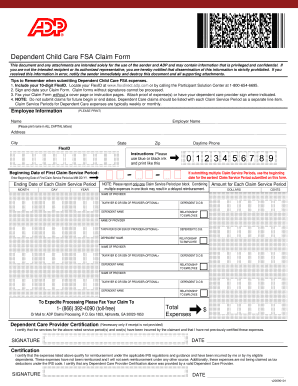
- Fill in the employee information section at the top of the form. This includes your full name, employer's name printed in all capital letters, address, city, state, zip code, daytime phone number, and FlexID. Ensure that you use blue or black ink if printing out the form.
- Specify the beginning date of the first claim service period in the format MM-DD-YY. This represents the start of the service period for which you are claiming expenses.
- For each claim service period, list the ending date in the corresponding block using the month, day, and year format. It is essential to report only one claim service period per block to avoid processing delays.
- Enter the amount for each claim service period in dollars and cents. Be accurate to ensure proper reimbursement.
- Provide the name of the dependent care provider and the optional taxpayer ID or social security number of the provider, if available.
- Include the dependent's date of birth, their full name, and indicate their relationship to you as the employee.
- If you have multiple dependents or claim service periods, repeat steps 5-7 for each additional entry. Ensure that each claim service period and corresponding expenses are listed clearly.
- Review your form for accuracy. Sign and date the Claim Form, as submissions without signatures cannot be processed.
- Submit your Claim Form by faxing it to 1-(866) 392-4090 or mailing it to ADP Claims Processing, P.O. Box 1853, Alpharetta, GA 30023-1853. Remember to include proof of expenses or relevant signatures.
- Once submitted, you may save changes, download, print, or share the completed form as needed.
Take the first step towards obtaining your reimbursements by completing the Dependent Child Care FSA Claim Form online today.
For 2022, the credit for child and dependent care expenses is nonrefundable and you may claim the credit on qualifying employment-related expenses of up to $3,000 if you had one qualifying person, or $6,000 if you had two or more qualifying persons.
Industry-leading security and compliance
US Legal Forms protects your data by complying with industry-specific security standards.
-
In businnes since 199725+ years providing professional legal documents.
-
Accredited businessGuarantees that a business meets BBB accreditation standards in the US and Canada.
-
Secured by BraintreeValidated Level 1 PCI DSS compliant payment gateway that accepts most major credit and debit card brands from across the globe.