Loading
Form preview
  • US Legal Forms
  • Other Templates
  • More Forms
  • More Uncategorized Forms
  • Prospect Recruiting Summary Sheet Football Prospect Information

Get Prospect Recruiting Summary Sheet Football Prospect Information

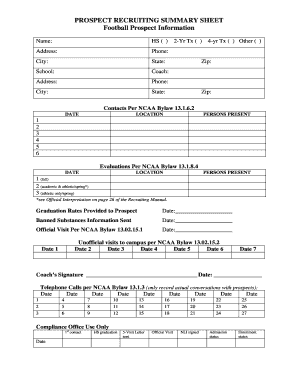
PROSPECT RECRUITING SUMMARY SHEET Football Prospect Information Name: HS ( ) Address: Phone: City: State: School: Coach: Address: Phone: City: 2-Yr Tx ( ) State: 4-yr Tx ( ) Other ( ) Zip: Zip: Contacts.

How it works

  1. Open form

    Open form follow the instructions

  2. Easily sign form

    Easily sign the form with your finger

  3. Share form

    Send filled & signed form or save

How to fill out the PROSPECT RECRUITING SUMMARY SHEET Football Prospect Information online

Filling out the Prospect Recruiting Summary Sheet for football prospect information is a crucial step in the recruiting process. This guide will walk you through each section of the form, ensuring you provide all necessary information accurately and effectively.

Follow the steps to complete the form correctly.

  1. Press the ‘Get Form’ button to access the Prospect Recruiting Summary Sheet and open it in your chosen editor.
  2. Begin filling in the 'Name' field with the prospect's full name.
  3. In the 'HS' field, indicate the high school the prospect attends, if applicable, by entering the name or selecting as appropriate.
  4. Fill in the 'Address' field with the prospect's current residential address, ensuring accuracy in street number and name.
  5. Enter the 'Phone' number where the prospect can be reached, in a standard format.
  6. Complete the 'City', 'State', and 'Zip' fields with the prospect's city, state, and postal code.
  7. In the 'School' section, provide the name of the school the prospect is currently attending.
  8. Under 'Coach', write the name of the prospect’s coach and their respective information (address and phone).
  9. Mark the appropriate type of transfer by checking the 2-Yr Tx, 4-yr Tx, or Other, as applicable.
  10. Document the contact details in the Contacts Per NCAA Bylaw sections, ensuring dates, locations, and persons present are recorded.
  11. Record evaluations following NCAA guidelines, making sure to note dates and relevant persons present for each evaluation.
  12. Complete sections regarding graduation rates provided, banned substances information sent, official and unofficial visits, as well as telephone calls logged.
  13. At the end of the form, ensure the coach's signature and date are filled in clearly.
  14. Finally, save your changes, and choose whether to download, print, or share the completed form as required.

Begin filling out your PROSPECT RECRUITING SUMMARY SHEET online today.

Get form

Experience a faster way to fill out and sign forms on the web. Access the most extensive library of templates available.
Get form

Related content

supporting our intercollegiate student-athletes...
According to them, 31 schools have been penalized for major recruiting ... Saturday...
Learn more
social media and networks in college football...
As stated by Herb Hand, then-offensive line coach at Penn. Page 33. 21. State, “Dropped...
Learn more
ncaa-football-14-manuals - cloudfront.net
Page 1. Page 2 ... information.www.xbox.com/support. ... list of recognized commands in...
Learn more

Related links form

FALL B2012b FUNDRAISER LETTER CANDY BARS REMINDERpub D Focus On The International Phonetic Alphabet IPA - English Banana Form I-854B - USCIS - Uscis Dd Form 2889

Questions & Answers

Get answers to your most pressing questions about US Legal Forms API.

Contact support

How do you start a professional email greeting? You should start a professional email with a greeting and the name and title of the recipient (e.g., “Dear Mr. Walken”). Then, you should include an introductory line like I hope this email finds you well, followed by the body of the email.

How to write about yourself confidently Introduce yourself . Include the most relevant professional experience. Mention significant personal achievements or awards. Introduce personal details. Use a casual and friendly tone.

Personal commercial template Greeting: Hello, my name is (name). ... Goal: I am looking for (internship/full-time position) at (employer name). Interest/passion: I am interested in (interests related to the company/industry). Strengths: I have many skills to contribute including (strengths) and (skills).

How to Introduce Yourself in Email – Checklist Write a concise and relevant subject line. Write to the person, not the lead. Use a formal greeting. Include personal connections and referrals. Be clear, concise but always courteous. Write a professional closing. Proof and spell check. Include promised attachments.

1. Email subject line for sending documents Documents attached – (what the documents are attached) Q1 Sales figures – Attached with this email. Please find (the document name) attached. (Document title) – Attached. Please review by (date) – (Document details)

Template of a business introduction email My name is [Your name] from [Company's Name]. [Introduce the company and what it does]. [Mention some distinct qualities and details about the company]. [Talk about some recent innovations in the company].

Hi (Recipient's name), My name is (your name), and I wanted to introduce myself to you. I'm starting as the (job title) at (company name). I've joined the business from (provide some details about where you've come from).

How to introduce yourself in an email professionally Craft a self-explanatory subject line. Before opening your email, the recipient will read the subject line. ... Refer to a mutual connection. ... Personalise the greeting. ... Acknowledge them. ... State the purpose of your email. ... Place a call to action (CTA) ... Thank them. ... Proofread.

Get This Form Now!

Use professional pre-built templates to fill in and sign documents online faster. Get access to thousands of forms.
Get form
If you believe that this page should be taken down, please follow our DMCA take down processhere.
Get PROSPECT RECRUITING SUMMARY SHEET Football Prospect Information
Get form
  • Adoption
  • Bankruptcy
  • Contractors
  • Divorce
  • Home Sales
  • Employment
  • Identity Theft
  • Incorporation
  • Landlord Tenant
  • Living Trust
  • Name Change
  • Personal Planning
  • Small Business
  • Wills & Estates
  • Packages A-Z
  • Affidavits
  • Bankruptcy
  • Bill of Sale
  • Corporate - LLC
  • Divorce
  • Employment
  • Identity Theft
  • Internet Technology
  • Landlord Tenant
  • Living Wills
  • Name Change
  • Power of Attorney
  • Real Estate
  • Small Estates
  • Wills
  • All Forms
  • Forms A-Z
  • Other Templates
  • Legal Hub
  • About Us
  • Help Portal
  • Legal Resources
  • Blog
  • Affiliates
  • Contact Us
  • Delete My Account
  • Site Map
  • Industries
  • Forms in Spanish
  • Localized Forms
  • State-specific Forms
  • Forms Kit
  • Real Estate Handbook
  • All Guides
  • Notarize
  • Incorporation services
  • For Consumers
  • For Small Business
  • For Attorneys
  • USLegal
  • FormsPass
  • pdfFiller
  • signNow
  • altaFlow
  • DocHub
  • Instapage
Form Packages
  • Adoption
  • Bankruptcy
  • Contractors
  • Divorce
  • Home Sales
  • Employment
  • Identity Theft
  • Incorporation
  • Landlord Tenant
  • Living Trust
  • Name Change
  • Personal Planning
  • Small Business
  • Wills & Estates
  • Packages A-Z
Form Categories
  • Affidavits
  • Bankruptcy
  • Bill of Sale
  • Corporate - LLC
  • Divorce
  • Employment
  • Identity Theft
  • Internet Technology
  • Landlord Tenant
  • Living Wills
  • Name Change
  • Power of Attorney
  • Real Estate
  • Small Estates
  • Wills
  • All Forms
  • Forms A-Z
  • Other Templates
Customer Service
  • Legal Hub
  • About Us
  • Help Portal
  • Legal Resources
  • Blog
  • Affiliates
  • Contact Us
  • Delete My Account
  • Site Map
  • Industries
  • Forms in Spanish
  • Localized Forms
  • State-specific Forms
  • Forms Kit
Legal Guides
  • Real Estate Handbook
  • All Guides
Prepared for you
  • Notarize
  • Incorporation services
Our Customers
  • For Consumers
  • For Small Business
  • For Attorneys
Our Sites
  • USLegal
  • FormsPass
  • pdfFiller
  • signNow
  • altaFlow
  • DocHub
  • Instapage
Social Media
Call us now toll free:
+1 833 426 79 33
As seen in:
© Copyright 1999-2026 airSlate Legal Forms, Inc. 17 Station Street, Ste. 203, Brookline, MA 02445
  • Your Privacy Choices
  • Terms of Service
  • Privacy Notice
  • Content Takedown Policy
  • Bug Bounty Program