Loading
Get Eteen Austin
How it works
-

Open form follow the instructions
-

Easily sign the form with your finger
-

Send filled & signed form or save
How to fill out the Eteen Austin online
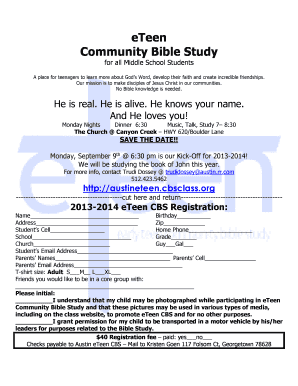
Filling out the Eteen Austin registration form online can be a straightforward and efficient process. This guide will provide you with detailed, step-by-step instructions to ensure that you complete the form accurately and effortlessly.
Follow the steps to fill out the Eteen Austin registration form online efficiently.
- Click ‘Get Form’ button to obtain the form and open it in the editor.
- Begin by entering the student's name in the designated field. Make sure to provide the full name as it appears on official documents.
- Input the student's birthday in the specified format, ensuring accuracy for age-related activities.
- Fill in the complete address, including street, city, and zip code, to help with communication and locale.
- Provide the student’s cell phone number in the appropriate field to facilitate quick communication.
- Fill out the home phone number for additional contact options.
- Indicate the school the student attends, which helps in community participation.
- Specify the current grade of the student, ensuring they are placed in the correct group.
- Enter the name of the church the student attends to integrate them within the community.
- Select the appropriate gender option by marking either 'Guy' or 'Gal' as applicable.
- Provide the student’s email address for digital communication regarding events and updates.
- Fill in the names of the parents or guardians to maintain proper contact information.
- Supply the parents’ cell phone numbers for direct communication if necessary.
- Input the parents’ email addresses for notifications and correspondence.
- Select the t-shirt size from the available options to ensure adequate sizing for all participants.
- In the section marked for friends, list any individuals the student wishes to be grouped with during activities.
- Initial in the designated areas to acknowledge understanding and consent regarding photography and transportation permissions.
- Indicate whether the $40 registration fee has been paid by marking 'yes' or 'no' in the corresponding section.
- Complete the form by checking that all fields are accurately filled before submitting.
- Save changes, download a copy, print the form, or share it as necessary to finalize the registration process.
Get started on completing your Eteen Austin registration form online today!
Related links form
Industry-leading security and compliance
US Legal Forms protects your data by complying with industry-specific security standards.
-
In businnes since 199725+ years providing professional legal documents.
-
Accredited businessGuarantees that a business meets BBB accreditation standards in the US and Canada.
-
Secured by BraintreeValidated Level 1 PCI DSS compliant payment gateway that accepts most major credit and debit card brands from across the globe.