Loading
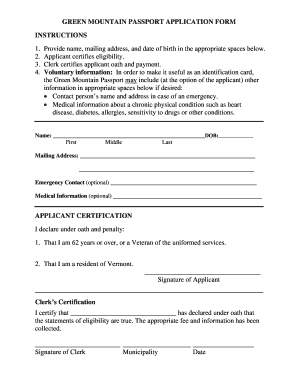
Get Green Mountain Passport Application Form ... - Highgatevt
How it works
-

Open form follow the instructions
-

Easily sign the form with your finger
-

Send filled & signed form or save
How to use or fill out the GREEN MOUNTAIN PASSPORT APPLICATION FORM online
Filling out the Green Mountain Passport Application Form is a straightforward process that enables individuals eligible for this identification card to apply online. This guide provides step-by-step instructions to ensure a smooth experience.
Follow the steps to successfully complete your application.
- Press the ‘Get Form’ button to access the application form and open it for editing.
- Complete the required information by providing your full name, mailing address, and date of birth in the designated fields. Ensure that you include your first, middle, and last names.
- Certify your eligibility by checking the appropriate boxes or making the necessary declarations as stated on the form. This may include confirming your age or veteran status.
- If desired, provide optional information for emergency contacts, such as a contact person's name and address, as well as any medical information related to chronic conditions.
- Sign the application to declare under oath that the provided information is true and accurate. Ensure that you include the date and your signature.
- Ensure that the clerk certifies your application by providing their signature, noting the municipality and the date.
- Once completed, save the changes to your form. You may choose to download, print, or share the application as needed.
Start your application process online today and ensure a successful submission.
Related links form
Interactive Transcripts The text is synchronized with the audio, and scrolls as the video plays. Interactive transcripts are both searchable and clickable, meaning that you can find a specific point in a video and jump to it.