Loading
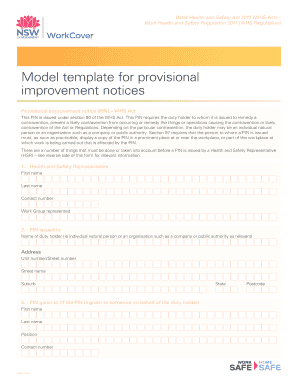
Get Provisional Improvement Notice
How it works
-

Open form follow the instructions
-

Easily sign the form with your finger
-

Send filled & signed form or save
How to fill out the Provisional Improvement Notice online
Filling out a Provisional Improvement Notice (PIN) online is a crucial process for health and safety representatives. This guide provides clear and detailed steps to assist users in completing the form accurately and effectively.
Follow the steps to complete the Provisional Improvement Notice.
- Click ‘Get Form’ button to obtain the form and open it in the editor.
- In the first section, enter the details of the Health and Safety Representative (HSR). Fill in their first name, last name, contact number, and the work group they represent. This information ensures that the recipient knows who to contact regarding the notice.
- Next, identify the duty holder to whom the PIN is issued. Include the name, address, unit number or street number, street name, suburb, state, and postcode. Ensure the accuracy of these details to avoid any issues in communication.
- If the PIN is given to someone on behalf of the duty holder, fill in the representative’s first name, last name, position, and contact number. This step is essential to clarify who will be responsible for addressing the contravention.
- Indicate whether consultation with the duty holder occurred prior to issuing the PIN by checking the appropriate box. This adherence to section 90(3) of the WHS Act is important for compliance.
- Detail the contravention in the following section. Document the site location, the name of the HSR, and the date you believe the contravention occurred. Be specific about the provision of the Work Health and Safety Act 2011 or the Work Health and Safety Regulation 2011 being contravened, and provide a brief description of how the contravention takes place.
- Record the date the PIN is issued and the date compliance with the PIN is required. Ensure that the compliance date is a minimum of eight days after the issue date.
- Finally, the HSR must sign the form. Once all fields are filled accurately, review the document to ensure completeness and correctness.
- After ensuring all information is accurate, you can save changes, download, print, or share the form as needed. Make sure to retain a copy for your records.
Complete your Provisional Improvement Notice online today to ensure compliance and safety in your workplace.
There are two types of enforcement notices that can be issued dependent on the situation and severity of the breach in health & safety. The notices will either be Improvement Notices or Prohibition Notices. Health and safety inspectors issue improvement notices to help businesses rectify health and safety failings.