Loading
Get Blue Cross Blue Shield Minnesota Watermark
How it works
-

Open form follow the instructions
-

Easily sign the form with your finger
-

Send filled & signed form or save
How to fill out the Blue Cross Blue Shield Minnesota Watermark online
Completing the Blue Cross Blue Shield Minnesota Watermark online can streamline your claims process and ensure that your healthcare expenses are properly documented. This guide provides a clear, step-by-step approach to efficiently filling out the necessary information on the form.
Follow the steps to successfully complete the form.
- Click ‘Get Form’ button to obtain the form and open it in the editor.
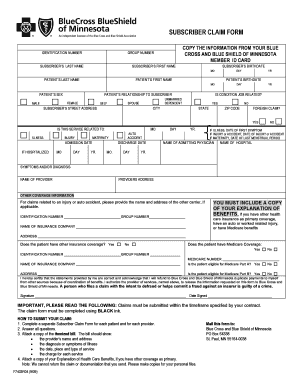
- Begin by entering your identification number as found on your Blue Cross Blue Shield Minnesota member ID card. This ensures your claim is linked to your account.
- Fill in the group number associated with your insurance plan, aiding in the processing of your claim.
- Complete the subscriber's last name and first name fields with your personal information.
- Enter the subscriber's birthdate, using the provided fields for month, day, and year.
- Next, provide the patient’s last and first name. These should reflect the individual receiving the medical services.
- Input the patient’s birthdate in the designated fields.
- Select the patient's sex by marking either 'male' or 'female'.
- Indicate the relationship of the patient to the subscriber by selecting one of the options provided: self, spouse, or dependent.
- Answer if the condition is job related by selecting 'yes' or 'no'. This helps determine the claim's eligibility.
- Enter the subscriber’s street address, city, state, and zip code to ensure accurate processing of your claim.
- If applicable, indicate if this is a foreign claim by selecting 'yes' or 'no'.
- Complete the section regarding the service related to the patient's condition by indicating the nature of the claim (illness, injury, maternity, etc.).
- Provide hospitalization admission and discharge dates if relevant, using the appropriate fields for month, day, and year.
- If the claim concerns an illness, input the date of the first symptom; if an injury, enter the date of injury; if maternity, provide the date of the last menstrual period.
- Fill in the name of the admitting physician and the hospital where services were rendered.
- List the symptoms or diagnosis received for better claim clarity.
- Enter the name and address of the provider in the designated fields.
- If there is other coverage information, provide the name and address of the other insurance carrier.
- Indicate if the patient has other insurance coverage, and provided correct identification and group numbers.
- Complete the certification statement by confirming the information is correct and signing in the designated area.
- Finally, review all entered details for accuracy and completeness. Once satisfied, you can save changes, download, print, or share the form as needed.
Start filling out your claim form online today to ensure timely processing of your healthcare claims.
Call (651) 662-5050, 1-800-262-0823. Email.