Loading
Get Automatic Payment Transfer Form - River Valley Bank
How it works
-

Open form follow the instructions
-

Easily sign the form with your finger
-

Send filled & signed form or save
How to fill out the Automatic Payment Transfer Form - River Valley Bank online
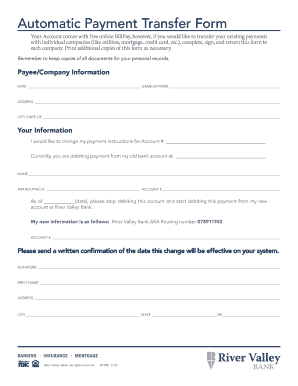
The Automatic Payment Transfer Form from River Valley Bank allows users to update their payment instructions for various services. This guide provides clear steps to help individuals fill out the form accurately and efficiently online.
Follow the steps to complete the form with ease.
- Press the ‘Get Form’ button to obtain the Automatic Payment Transfer Form and open it in your preferred editor.
- Begin filling out the form by providing the date at the top of the page. Make sure this reflects the current date.
- Complete the payee/company information section, entering the name of the payee, their address, city, state, and zip code in the specified fields.
- In your information section, state your existing account number that payment is currently being debited from and provide the old bank account details, including the account holder's name, ABA routing number, and account number.
- Indicate the date on which you would like the new payment instructions to take effect, ensuring accuracy.
- Fill in the details for your new account at River Valley Bank, including the River Valley Bank ABA routing number and your new account number.
- Request a written confirmation and provide a signature in the designated area, along with your printed name and address.
- Finally, review the completed form and save your changes. You can then download, print, or share the form as needed.
Complete your Automatic Payment Transfer Form online today to ensure seamless payment updates.