Loading
Get Xhubs
How it works
-

Open form follow the instructions
-

Easily sign the form with your finger
-

Send filled & signed form or save
How to fill out the Xhubs online
This guide provides clear instructions on how to complete the Xhubs form online. By following these steps, users will be able to efficiently fill out the form and submit it without any confusion.
Follow the steps to successfully complete the Xhubs form.
- Click the ‘Get Form’ button to access the Xhubs form and open it in your chosen digital document editor.
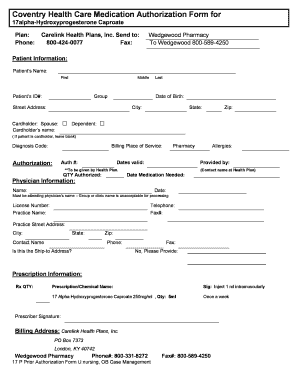
- Begin filling out the patient information section. Enter the patient’s first name, middle name, and last name in the appropriate fields. Make sure to include their ID number, date of birth, and complete street address, including city, state, and zip code.
- Indicate the cardholder's information. Specify if the cardholder is a spouse or dependent. If the patient is also the cardholder, leave the cardholder's name section blank.
- Enter the diagnosis code and billing place of service details. Obtain the authorization number from the health plan as it is necessary for processing the form.
- In the physician information section, provide the attending physician’s details, including their name, license number, practice name, and contact information. Ensure that the contact name and phone number are also included.
- Fill in the prescription information. Include the prescription quantity, the chemical name, and specific instructions (sig) indicated for the medication. Make sure to note how many milliliters should be injected and the frequency of administration.
- After completing the form, review all the provided information for accuracy. Once confirmed, you can choose to save your changes, download a copy for your records, print the form, or share it as necessary.
Begin filling out your documents online today to ensure swift processing!
Search for a location or zoom in on the map until you can see the area you want to see zip codes for. In the map legend, click the "Zoom to area" button. Type in the zip code you want to see in the search box and press Enter. Google Maps will zoom in on the area and highlight the boundary of the zip code.