Loading
Get Facility Application Form - Coventry Health Care
How it works
-

Open form follow the instructions
-

Easily sign the form with your finger
-

Send filled & signed form or save
How to fill out the Facility Application Form - Coventry Health Care online
This guide provides a step-by-step approach to completing the Facility Application Form for Coventry Health Care online. By following these instructions, users can efficiently fill out the necessary fields and ensure all required documents are submitted.
Follow the steps to successfully complete the facility application form.
- Click ‘Get Form’ button to access the application form and open it in your preferred online editor.
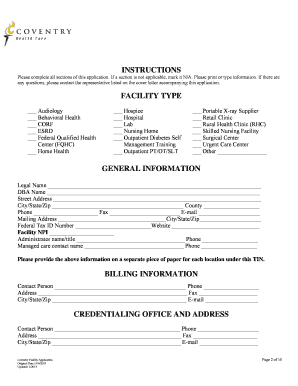
- Begin filling out the facility type section by selecting your facility's category from the provided options. Make sure to mark only the relevant option.
- In the general information section, enter the legal name and DBA name, followed by the physical address, city, state, and zip code. Provide the relevant contact information including phone number and email.
- Complete the billing information by providing the name of the contact person, address, phone number, and email address for billing purposes.
- Fill in the credentialing office details, including contact name, address, phone number, and email.
- For the ownership and control section, indicate the ownership structure of the facility and provide the necessary address.
- Complete the services section by answering questions about emergency services, wheelchair accessibility, and Medicaid acceptance.
- In the licensure/DEA section, list your state license numbers, expiration dates, and provide any DEA certificate information required.
- Accurate information must be provided in the accreditation/certification section. Attach copies of relevant certificates.
- Fill out the professional liability insurance section with the policy number, carrier name, coverage dates, and limits.
- Address the confidential additional information section by answering all questions truthfully. If necessary, provide explanations on a separate page.
- Finally, certify the application by providing your signature, printed name, title, and date to validate the information provided.
- Once all sections are completed, save your changes, and choose to download, print, or share the form as required.
Complete your Facility Application Form online today to ensure a smooth submission process.
The ZIP stands for Zone Improvement Plan; the codes were invented to help the postal service automate mail sorting methods. (The fact that it's an acronym means that, yes, the ZIP in ZIP code should be capitalized.)