Loading
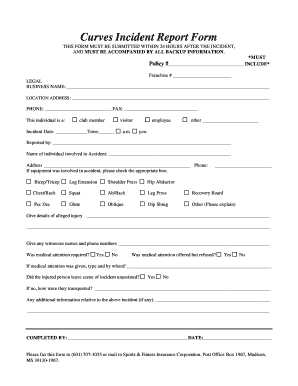
Get Insurance Incident Form
How it works
-

Open form follow the instructions
-

Easily sign the form with your finger
-

Send filled & signed form or save
How to fill out the Insurance Incident Form online
Filling out the Insurance Incident Form online is a vital step in reporting any incidents accurately and efficiently. This guide provides clear, step-by-step instructions to help you complete each section of the form with ease.
Follow the steps to accurately complete the Insurance Incident Form.
- Click ‘Get Form’ button to obtain the form and open it in the editor.
- Begin by entering your policy number and franchise number in the designated spaces at the top of the form. Ensure that these details are accurate as they are crucial for processing your report.
- Fill out the legal business name and location address fields. Provide a reliable contact phone number and fax number for communication purposes related to the incident.
- Identify the individual involved in the incident by selecting whether they are a club member, visitor, employee, or another category. Record the exact date and time of the incident.
- Input the name of the person reporting the incident in the 'Reported by' section, along with the name and contact details of the individual involved in the accident.
- If any equipment was involved in the accident, check the corresponding box from the provided options such as bicep/tricep, leg extension, or any other equipment. If selecting 'Other,' provide a brief description.
- Detail any alleged injuries in the space provided. Be comprehensive to ensure all necessary information is included for further support.
- List the names and phone numbers of any witnesses to the incident. Their accounts can be useful for clarifying circumstances surrounding the incident.
- Indicate whether medical attention was required or offered but refused. If medical assistance was provided, describe the type of assistance given and by whom.
- Note whether the injured person left the scene unassisted. If assistance was necessary, describe how they were transported away from the incident site.
- Use the additional information section to provide any other relevant details that may assist in the review of the incident.
- Complete the form by adding your name and the date you filled it out. Review all entries for accuracy before submission.
- Once completed, you can save changes, download a copy of the form, print it, or share it as necessary. Submission should be completed within 24 hours of the incident.
Complete your Insurance Incident Form online today to ensure proper documentation and timely processing.
Incident Report Sample Walkthrough: A Step-by-Step Guide Step 1: Provide Fundamental Information. ... Step 2: Take Note of Any Damages and Injuries. ... Step 3: Identify Affected Individual(s) ... Step 4: Identify Witnesses and Take Their Statements. ... Step 5: Take Action. ... Step 6: Close Your Report.
Industry-leading security and compliance
US Legal Forms protects your data by complying with industry-specific security standards.
-
In businnes since 199725+ years providing professional legal documents.
-
Accredited businessGuarantees that a business meets BBB accreditation standards in the US and Canada.
-
Secured by BraintreeValidated Level 1 PCI DSS compliant payment gateway that accepts most major credit and debit card brands from across the globe.