Loading
Get Cafe Meal Plan Authorization Form - Colum
How it works
-

Open form follow the instructions
-

Easily sign the form with your finger
-

Send filled & signed form or save
How to fill out the CAFE MEAL PLAN AUTHORIZATION FORM - Colum online
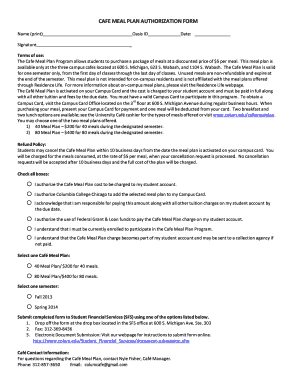
Filling out the CAFE MEAL PLAN AUTHORIZATION FORM is an essential step for students wishing to participate in the meal plan program. This guide provides clear, step-by-step instructions on how to complete the form accurately and efficiently online.
Follow the steps to complete the CAFE meal plan authorization form online.
- Press the ‘Get Form’ button to obtain the CAFE MEAL PLAN AUTHORIZATION FORM and open it in your preferred editor.
- In the 'Name (print)' section, clearly type your full name as it appears on your identification.
- In the 'Signature' field, provide your signature to authorize the form.
- Enter your Oasis ID in the provided space to verify your student identity.
- Fill in the date when you are completing the form in the specified format.
- Review the terms of use to understand the meal plan details and ensure you agree to them.
- Check all boxes to provide the necessary authorizations regarding the charges to your student account, selection of the meal plan, and understanding of the payment responsibilities.
- Select your preferred Cafe Meal Plan option (40 Meal Plan or 80 Meal Plan) based on your meal needs.
- Choose the semester for which you are applying for the meal plan.
- Once all fields are completed, save your changes and proceed to download, print, or share the completed form as required.
Start completing your CAFE MEAL PLAN AUTHORIZATION FORM online now!
Open the PDF document or form in Acrobat or Reader, and click Fill & Sign in the right pane. Click the Sign icon in the Fill & Sign toolbar, and then choose whether you want to add your signature or just initials. If you have already added signatures or initials, they are displayed as options to choose from.