Loading
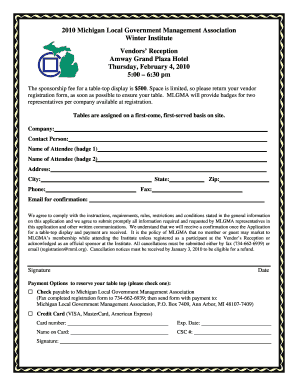
Get Vendor Registration Form.doc. Free Powerpoint Poster Templates - Mlgma
How it works
-

Open form follow the instructions
-

Easily sign the form with your finger
-

Send filled & signed form or save
How to fill out the Vendor Registration Form.doc. Free PowerPoint Poster Templates - Mlgma online
Filling out the Vendor Registration Form is a crucial step for participation in the Michigan Local Government Management Association's event. This guide provides clear, step-by-step instructions to assist you in completing the form efficiently and accurately.
Follow the steps to complete the Vendor Registration Form online.
- Press the ‘Get Form’ button to access the Vendor Registration Form and open it in your preferred document editor.
- In the 'Company' field, enter the full name of your organization. This helps identify your business at the event.
- Fill in the 'Contact Person' field with the name of the individual responsible for managing your registration.
- Complete the 'Name of Attendee (badge 1)' and 'Name of Attendee (badge 2)' fields with the names of individuals who will represent your company at the event. These names will be used for the badges.
- Provide the organization’s complete address in the designated fields: 'Address', 'City', 'State', and 'Zip'. This information is essential for communication purposes.
- Enter a primary contact number in the 'Phone' field and a secondary one in the 'Fax' field, if applicable. Ensure the numbers are accurate.
- In the 'Email for confirmation' field, input an email address that will be monitored for receipt confirmation and further communication.
- Review the section regarding compliance to confirm your agreement with the requirements and conditions for participation. Also, ensure you sign and date the form in the respective fields.
- Choose your payment option by checking either 'Check' or 'Credit Card'. If using a credit card, fill out the card details, including the card number, expiration date, name on the card, and CSC number.
- Once all fields are completed, save your changes, download or print the form, and share it with the appropriate party to submit.
Complete your Vendor Registration Form online today to secure your participation.
Industry-leading security and compliance
US Legal Forms protects your data by complying with industry-specific security standards.
-
In businnes since 199725+ years providing professional legal documents.
-
Accredited businessGuarantees that a business meets BBB accreditation standards in the US and Canada.
-
Secured by BraintreeValidated Level 1 PCI DSS compliant payment gateway that accepts most major credit and debit card brands from across the globe.