Loading
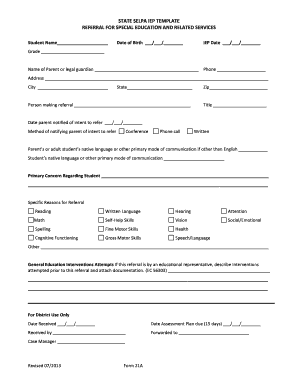
Get Referral Form Special Education And Related Services
How it works
-

Open form follow the instructions
-

Easily sign the form with your finger
-

Send filled & signed form or save
How to fill out the Referral Form Special Education And Related Services online
Completing the Referral Form for Special Education and Related Services is an essential step in ensuring that students receive the necessary support for their educational journey. This guide provides a clear, step-by-step approach to filling out the form online, making the process accessible for all users.
Follow the steps to successfully complete the referral form.
- Click ‘Get Form’ button to obtain the form and open it in the editor.
- Fill in the student's name, date of birth, IEP date, and grade. These fields are essential for identifying the student receiving the referral.
- Enter the name of the parent or legal guardian, along with their phone number and address. This information is crucial for communication purposes.
- Specify the person making the referral and include their title. This indicates who is responsible for the referral process.
- Record the date the parent was notified of the intent to refer, and document the method of notification (e.g., conference, phone call, written). This ensures transparency in the communication process.
- Provide the parent’s or adult student's native language and the student's primary mode of communication if it differs from English. This helps tailor support to the student's needs.
- Detail the primary concern regarding the student. This section should capture the main issues observed that led to the referral.
- Check specific reasons for referral from the provided list (e.g., reading, written language, math). You may also specify any other reasons not mentioned.
- If applicable, describe general education interventions attempted prior to this referral and attach any supporting documentation. This step is necessary to show the efforts made before submitting a referral.
- In the ‘For District Use Only’ section, leave space for district personnel to fill out the dates received and assessment plan due. This section is usually not for the referrer to complete but is important for tracking purposes.
- Once all sections are completed, save your changes, and you can choose to download, print, or share the completed form as necessary.
Start filling out your Referral Form for Special Education and Related Services online today to ensure timely support for students.
If your child is between the ages of three- to five-years-old, and you suspect he needs special education services, your first step will be to contact your school district and request an evaluation. When you request that your child be evaluated for special education this is called a referral.