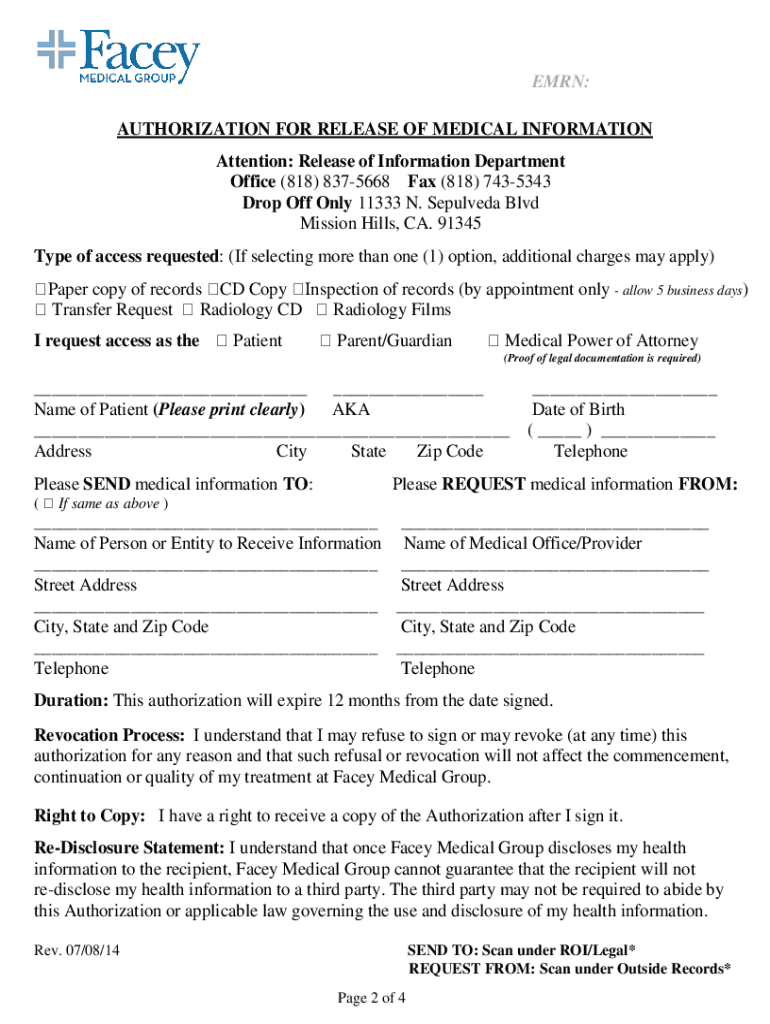
Please review the following guidelines and instructions to expedite your receipt of your medical records. California law (AB610) allows the healthcare provider a 15-day turnaround time from the date a request is received, to process a patient s request for copies of their medical records. Facey s turn-around time is about 15 business days depending on the location of your medical records (off-site storage, off-site clinic locations, etc). The growing number in Federal and State statutes reg.

Open form follow the instructions

Easily sign the form with your finger

Send filled & signed form or save
How to fill out the Online Doctor Notes Print online
The Online Doctor Notes Print is an essential document for users seeking to request their medical information. This guide provides clear instructions on navigating each section of the form to ensure a smooth and efficient completion process.
Follow the steps to accurately fill out the Online Doctor Notes Print form.
- Press the ‘Get Form’ button to access the document and open it in your preferred online editor.
- Begin by filling in your personal information in the designated fields. This includes your name, date of birth, address, and contact information. Ensure that all entered details are accurate and clearly legible.
- Specify the type of access requested from the options available, such as a paper copy of records, a CD copy, an inspection of records, or a transfer request. If selecting multiple options, be aware that additional charges may apply.
- Indicate your relationship to the patient if you are completing the form on their behalf. Proof of legal documentation may be required.
- Clearly outline the records to be released by checking the appropriate boxes. You may specify time periods for general medical information, radiology results, mental health records, etc.
- Sign and date the authorization for release of medical information. Review the terms and ensure you understand the rights associated with your authorization.
- Submit the completed forms along with any necessary payments. You can choose to drop off, mail, or email the documents as instructed.
- Finally, ensure you save, download, or print your filled-out copy for your records before completing the process.
Complete your document requests online today for efficient processing!
Experience a faster way to fill out and sign forms on the web. Access the most extensive library of templates available.
Related content
Nov 2, 2017 — Increasingly doctors' notes can be accessed via secure online patient...
doctor on this list we have collected 25 free printable doctors note templates ... a...
Medicine is the science and practice of establishing the diagnosis, prognosis, treatment...
Get answers to your most pressing questions about US Legal Forms API.
Can you get a sick note without seeing a doctor?
A fit note must be signed by a doctor, but you do not always need to see a GP in person to get one.
Can doctors write fake notes?
Consequences of Forged Doctor's Excuse Notes Utilizing a fake doctor's note is illegal and furthermore ethically mistaken to deceive your manager. Many individuals really utilize genuine doctor's name in the not real specialist letter. They then produce the doctor's sign.
Can you get in trouble for faking a doctor's note?
It is illegal and morally wrong for an employee to submit a fake doctor's note to his or her employer. ... Employers should also make an effort to ensure that employees understand the penalties they can face if caught using fake doctor notes.
Can you get a doctor's note online?
You can talk to an online doctor and get a doctor's note through PlushCare. Our board certified physicians are highly trained and can diagnose your condition and prescribe any necessary medications.
Can I get a sick note without seeing the doctor?
A fit note must be signed by a doctor, but you do not always need to see a GP in person to get one.
Is forging a doctor's note a crime?
Forgery is a Class C Felony 3-10 years. There would also be collateral consequences for whatever they are trying to get a degree for. Professional boards have to approve doctors, nurses, etc.
Is faking a doctor's note illegal?
It is illegal and morally wrong for an employee to submit a fake doctor's note to his or her employer. ... Employers should also make an effort to ensure that employees understand the penalties they can face if caught using fake doctor notes.
Is it illegal to print fake doctors notes?
A blank note from a doctor to excuse an absence is a bit more difficult than forging a printable doctor's form from your mom when skipping school, but it certainly is not impossible. Never forge a real persons signature as this is likely illegal and can get you into trouble.
Where can I get a fake doctor's note?
If your doctor isn't available for some reason, you can go to another clinic and ask for the note. Some doctors are willing to provide a fake doctor's note or a note without checkup for a fee. However, you need to keep in mind that not all doctors will be willing to provide you a medical note without check up.
How can I get a doctor to give me a sick note?
How do you get a sick note from a doctor? If you need a "fit note" make an appointment with your local GP. They will assess you and decide if you are in a healthy condition for work or not. If they deem that you are "not fit for work" they will write a note to that effect that you can present to your employer.
Use professional pre-built templates to fill in and sign documents online faster. Get access to thousands of forms.
If you believe that this page should be taken down, please follow our DMCA take down process here.